

Arduino Uno R3 Pinout
Find the Arduino Uno R3 pinout, digital and analog pins, memory limits, and Circuitera compile/upload support. Check board-specific library compatibility.
- Processor
- ATMEGA328P
- Clock
- 16 MHz
- Physical flash
- 32768 bytes
- Application flash
- 32256 bytes
- SRAM
- 2048 bytes
- EEPROM
- 1024 bytes
- Digital pins
- 14
- Analog inputs
- 6
- PWM
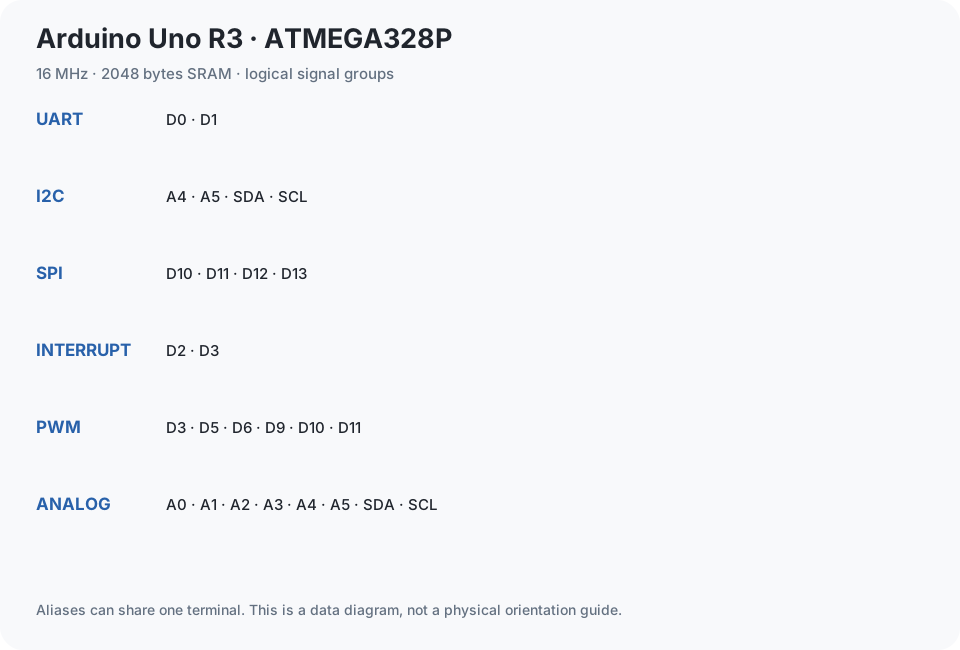
- D3, D5, D6, D9, D10, D11
- Hardware UARTs
- 1
- UART pins
- D0, D1
- I2C
- A4, A5, SDA, SCL
- SPI
- D10, D11, D12, D13
- External interrupts
- D2, D3
- Logic voltage
- 5 V
- Bootloader
- Optiboot
- Protocol / baud
- STK500v1 · 115200
- Compile capability
- Verified · automated compile
- Upload capability
- Untested · physical hardware
- Serial capability
- Untested · physical hardware
- Simulation
- Uno model supported
- Build-matched compile check
- 2026-10-25
Choose the Uno R3 target
Select Arduino Uno R3 before pressing Verify. Circuitera compiles for the 16 MHz ATmega328P using the standard Arduino pin variant. The profile provides 32,256 bytes of application flash and 2,048 bytes of SRAM. The build summary reports program storage and static RAM separately; the running sketch also needs space for its stack and dynamically allocated data.
Start with pins you can check
Use LED_BUILTIN for an onboard Blink test. Uno R3 exposes digital pins D0–D13 and analog inputs A0–A5. PWM is available on D3, D5, D6, D9, D10, and D11. A4 and A5 serve I2C SDA and SCL. Consult the IDE’s pin helper before wiring, and use a current-limiting resistor for an external LED.
Upload and inspect the result
With a successful build, connect a USB data cable and choose the board’s port in Connect board. The Uno profile uses its serial bootloader for upload and reads firmware back to verify it. Keep D0/D1 clear of devices that interfere with the serial connection. Open Serial Monitor at the baud rate in Serial.begin() to read values from the sketch.
Match the board, not just its name
This guide covers Uno R3 with ATmega328P. Uno R4 has a different processor and is not supported by this AVR profile. Clones may use a different USB bridge or bootloader; a port name alone cannot prove the MCU. For supported circuits, the simulator can help explore behavior, but real wiring and hardware still need checking.
Upload and validation limits
Select the actual board and bootloader, use a USB data cable, and grant one port permission. Keep serial pins clear of interfering peripherals.
No physical upload certification recorded in these build reports. Compile capability, simulated protocol tests and physical upload are separate claims.
Toolchain: avr-gcc-wasm@0.2.0. Last matching compile evidence: 2026-10-25. Build: e0f6d304cce4ae0a0989a9b1300cbc1a21a595e5e3e7f57ed0ab3468ecf7940b.
Arduino Uno R3 pinout table
Every pin and alias is present in the initial HTML. Filter by signal capability, or select a pin for its existing reference details. Disconnect power before changing wiring.
27 pin entries
Select a pin to read its capabilities.
| Pin | Capabilities | Details |
|---|---|---|
| DIGITAL · UART | RX · shared with the USB serial connection | |
| DIGITAL · UART | TX · shared with the USB serial connection | |
| DIGITAL · INTERRUPT | External interrupt INT0 | |
| DIGITAL · PWM · INTERRUPT | External interrupt INT1 · PWM | |
| DIGITAL | Digital input/output | |
| DIGITAL · PWM | Digital input/output · PWM with analogWrite() | |
| DIGITAL · PWM | Digital input/output · PWM with analogWrite() | |
| DIGITAL | Digital input/output | |
| DIGITAL | Digital input/output | |
| DIGITAL · PWM | Digital input/output · PWM with analogWrite() | |
| DIGITAL · PWM · SPI | SS · SPI chip select | |
| DIGITAL · PWM · SPI | MOSI · SPI data to peripherals | |
| DIGITAL · SPI | MISO · SPI data from peripherals | |
| DIGITAL · SPI | SCK · also connected to the onboard LED | |
| ANALOG · DIGITAL | 10-bit analog input (0–1023). Also digital pin 14. | |
| ANALOG · DIGITAL | 10-bit analog input (0–1023). Also digital pin 15. | |
| ANALOG · DIGITAL | 10-bit analog input (0–1023). Also digital pin 16. | |
| ANALOG · DIGITAL | 10-bit analog input (0–1023). Also digital pin 17. | |
| ANALOG · DIGITAL · I2C | 10-bit analog input (0–1023). Also digital pin 18. SDA · shared with the SDA header. | |
| ANALOG · DIGITAL · I2C | 10-bit analog input (0–1023). Also digital pin 19. SCL · shared with the SCL header. | |
| POWER | 5 V power rail, not a programmable I/O pin. | |
| POWER | 3.3 V regulated output, up to 50 mA. Not a programmable pin. | |
| GROUND | Common ground reference. Join the ground of connected modules to GND. | |
| POWER | External power input before the regulator. For first projects, power the Uno through USB. | |
| RESET | Pulling RESET low restarts the microcontroller. The reset button does the same. | |
| I2C · DIGITAL · ANALOG | I2C data. Electrically the same pin as A4, not an extra independent pin. | |
| I2C · DIGITAL · ANALOG | I2C clock. Electrically the same pin as A5, not an extra independent pin. |
Library compile results
Actual source/hash-matched results for this exact profile. A passed compile does not prove a real peripheral, motor or wiring works.
| Library | Pinned version | Result | Flash / static RAM | Test date |
|---|---|---|---|---|
| HID | 1.0 | UNSUPPORTED | Not recorded | 2026-10-25 |
| Keyboard | 1.0.7 | UNSUPPORTED | Not recorded | 2026-10-25 |
| Mouse | 1.0.1 | UNSUPPORTED | Not recorded | 2026-10-25 |
| Servo | 1.3.0 | PASS | 2522 / 50 bytes | 2026-10-25 |
| Wire | 1.0 | PASS | 4494 / 408 bytes | 2026-10-25 |
| SPI | 1.0 | PASS | 2728 / 192 bytes | 2026-10-25 |
| EEPROM | 2.0 | PASS | 2424 / 188 bytes | 2026-10-25 |
| SoftwareSerial | 1.0 | PASS | 3466 / 301 bytes | 2026-10-25 |
| LiquidCrystal | 1.0.7 | PASS | 2232 / 59 bytes | 2026-10-25 |
| DHT | 1.4.7 | PASS | 5610 / 219 bytes | 2026-10-25 |
| Adafruit Unified Sensor | 1.1.15 | PASS | 9226 / 302 bytes | 2026-10-25 |
| Adafruit GFX | 1.12.6 | PASS | 10952 / 533 bytes | 2026-10-25 |
| Adafruit SSD1306 | 2.5.17 | PASS | 13868 / 399 bytes | 2026-10-25 |
| Adafruit BusIO | 1.17.4 | PASS | 7140 / 438 bytes | 2026-10-25 |
| Adafruit NeoPixel | 1.15.5 | PASS | 3270 / 41 bytes | 2026-10-25 |
| NewPing | 1.9.7 | PASS | 3304 / 209 bytes | 2026-10-25 |
| IRremote | 4.7.1 | PASS | 12096 / 491 bytes | 2026-10-25 |
| Keypad | 3.1.1 | PASS | 3922 / 327 bytes | 2026-10-25 |
| AccelStepper | 1.64 | PASS | 6118 / 119 bytes | 2026-10-25 |
| LiquidCrystal_I2C | 1.1.2 | PASS | 4006 / 275 bytes | 2026-10-25 |
Projects and next steps
These tutorials have Uno compile and modeled execution evidence.