

Arduino Blink
Make an LED blink, then change its rhythm. Learn how setup(), loop(), digitalWrite(), and delay() control a real output.
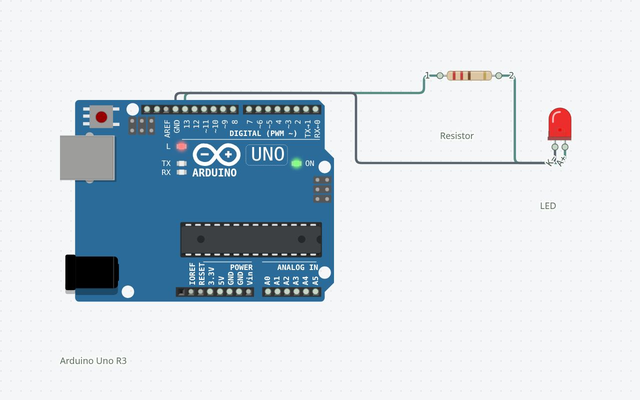
Wire it up
Disconnect power before changing connections. Follow terminal names rather than wire colors.
| From | To | Why it matters |
|---|---|---|
| D13 | 220 Ω resistor | Series current limiting |
| Resistor | LED anode (+) | Long lead on a typical LED |
| LED cathode (−) | GND | Short lead / flat side on a typical LED |
The complete sketch
const int ledPin = 13;

void setup() {
  pinMode(ledPin, OUTPUT);
}

void loop() {
  digitalWrite(ledPin, HIGH);
  delay(1000);
  digitalWrite(ledPin, LOW);
  delay(1000);
}
The launch buttons use this same code and a matching saved circuit.
Build it step by step
Connect the LED
With USB unplugged, connect D13 through the 220 Ω resistor to the LED anode, then connect its cathode to GND. The resistor must stay in series.
Open the sketch
Open in Circuitera creates a new Uno sketch. For a physical Nano or Mega, select its exact profile before verifying.
Verify, connect, upload
Choose Verify. After a successful build, use Connect board, grant Web Serial permission, and Upload.
Change the rhythm
Try 250 ms for the on interval and 1000 ms for the off interval. Verify and upload again, or run the edited sketch in the simulator.
Understand the sketch
One-time setup
pinMode selects output mode once. ledPin names the pin so the code and wiring are easy to compare.
A repeating cycle
loop repeats forever. HIGH drives the output high; LOW drives it low. delay uses milliseconds and blocks the sketch during each wait.
Current and polarity
Current flows from the high output through the resistor and LED to ground. The resistor limits current; an LED works in one direction. The onboard LED can also blink without an external circuit.
If something is different
Nothing lights
Check LED polarity, the ground connection, D13, and whether the correct sketch was uploaded.
The LED stays on
Confirm both digitalWrite calls are present and that the uploaded program matches the editor.
Upload fails
Check the data cable, board/bootloader selection, port permission, and other programs using the port. A compile error is a separate problem.
Expected output and tested scope
The LED alternates on and off at the programmed intervals. Changing a delay changes the rhythm.
Version 1 · Last source- and build-matched test: 2026-10-25. Actual shipped AVR-GCC WASM compilation and Uno AVR engine execution; no physical hardware test.
Supported tutorial target: Arduino Uno R3 / ATmega328P. Compile: PASS · Modeled execution: PASS. Other boards require a separate review of pins, voltage, libraries and the exact build profile.