

Servo Sweep
Use the Servo library to sweep a positional servo. Learn attach(), write(), for loops, and why a motor needs a suitable power supply.
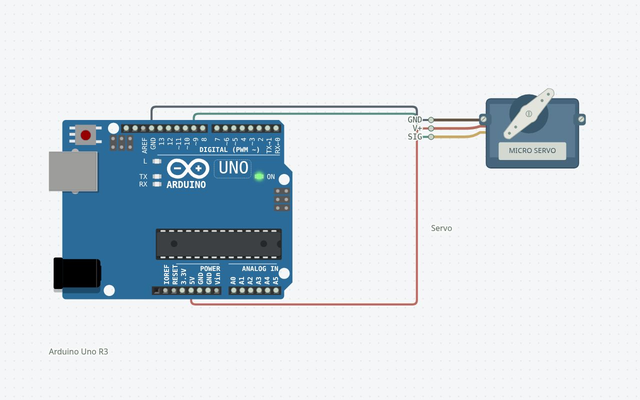
Wire it up
Disconnect power before changing connections. Follow terminal names rather than wire colors.
| From | To | Why it matters |
|---|---|---|
| D9 | Servo signal | Often orange or yellow; check the servo pinout |
| Servo supply + | Servo V+ | Use the rated regulated supply, not an I/O pin |
| Supply GND + Arduino GND | Servo GND | All signal references share ground |
The complete sketch
#include <Servo.h>

Servo arm;
const int servoPin = 9;

void setup() {
  arm.attach(servoPin);
}

void loop() {
  for (int angle = 0; angle <= 180; angle++) {
    arm.write(angle);
    delay(15);
  }
  for (int angle = 180; angle >= 0; angle--) {
    arm.write(angle);
    delay(15);
  }
}
The launch buttons use this same code and a matching saved circuit.
Build it step by step
Check the motor
Use a positional servo, not a continuous-rotation model. Confirm its voltage, lead order, travel limits, and current requirements.
Wire signal and power
Disconnect power while wiring. Connect signal to D9 and join grounds. Power the servo from an appropriate regulated supply; avoid feeding an external supply into the USB 5 V rail.
Compile with Servo
Open the project, choose your board, and Verify. Servo is in Circuitera’s bundled library collection.
Run without a load
Keep the horn clear of objects. Upload and observe. Reduce the angle range if the mechanism reaches a stop or strains.
Understand the sketch
A Servo object
The library manages pulse timing. attach(9) associates arm with D9; the signal is a sequence of timed pulses, not an analog voltage.
Counting through angles
The first for loop increments angle to 180. The second decrements it to zero. write requests a position; delay lets the motor move between steps.
Simulation and real power
The simulator models angle and uses its 5 V node for the virtual servo. A real motor’s current draw, torque, and power supply are not fully modeled. Never power a servo from a digital pin.
If something is different
Jitter or board resets
Use a suitable servo supply and common ground. USB power may be inadequate under load.
Unexpected motion
Confirm this is a positional servo, check the signal lead, and start with a smaller angle range.
Other PWM outputs change
Servo uses hardware timers. Timer/PWM interactions depend on the board; review the library and board reference before combining features.
Expected output and tested scope
The virtual positional servo sweeps through the requested range; real travel and current depend on the motor.
Version 1 · Last source- and build-matched test: 2026-10-25. Actual shipped AVR-GCC WASM compilation and Uno AVR engine execution; no physical hardware test.
Supported tutorial target: Arduino Uno R3 / ATmega328P. Compile: PASS · Modeled execution: PASS. Other boards require a separate review of pins, voltage, libraries and the exact build profile.