

Tested with Circuitera 1.0.0: the article’s complete C++ sketch compiled for Arduino Uno R3 using avr-gcc-wasm@0.2.0 on 2026-10-26 (UTC). The sketch also passed its recorded Uno model checks. No physical board was tested.
The target is the microcontroller
AVR-GCC is the GCC toolchain built to generate code for AVR microcontrollers. A classic Uno R3 uses an ATmega328P; a Mega 2560 uses an ATmega2560. Selecting the board affects device definitions, clock assumptions, pin mappings, libraries and memory limits. An Uno R4 uses a different architecture, so “Arduino code” does not imply one compiler or one binary for every board.
An Arduino sketch uses C++ plus the Arduino core’s functions and startup machinery. setup() and loop() are useful entry points provided by that environment; the chip does not natively understand a sketch file. A core implementation supplies the startup path that calls them.
From a sketch to firmware bytes
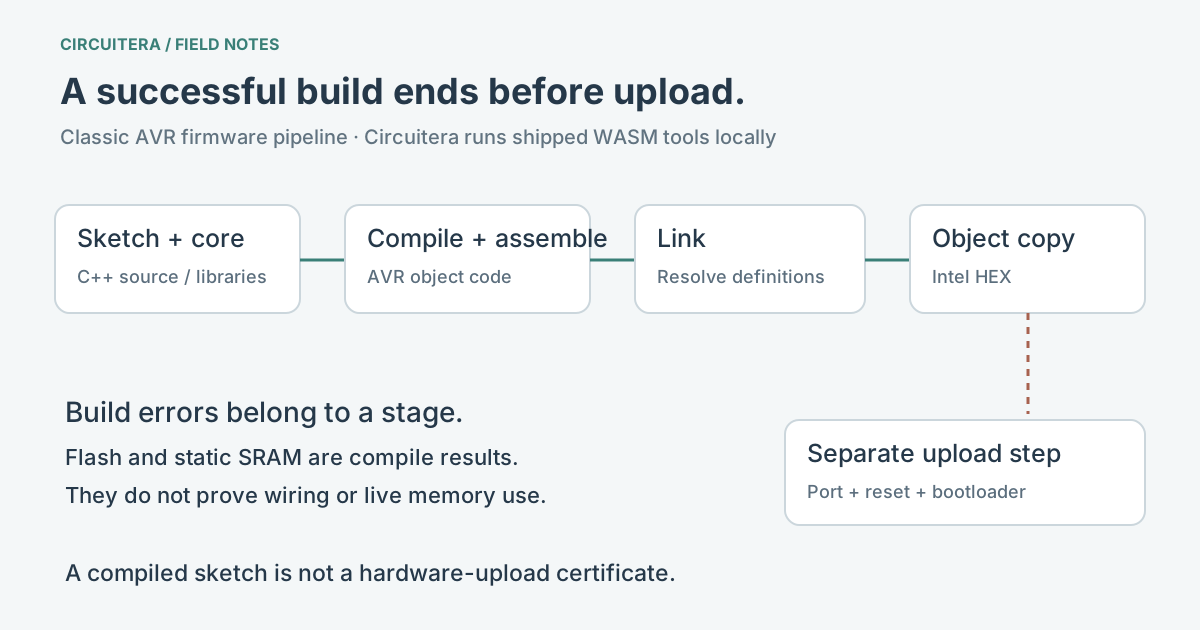
The Arduino build-process documentation describes preparation of sketch source, dependency discovery, compilation, linking and HEX generation. Headers supply declarations; library source and core objects supply implementations. The compiler translates source into object code. The linker resolves references and chooses where the needed pieces belong in the final program. Object-copy tools then produce the format expected by the upload path.
A missing semicolon is typically a compilation problem. An “undefined reference” is often a linking problem: a declaration was seen, but a required definition was not linked. A missing header is a dependency problem. Reading the first useful diagnostic is more effective than treating every error as a reason to reinstall a USB driver.
A small sketch that exercises those pieces
This example calls core GPIO, timing and serial functions. Verify it without a board attached, then look at the actual build result. The LED activity requires execution; compiling alone does not make anything blink.
void setup() {
  pinMode(LED_BUILTIN, OUTPUT);
  Serial.begin(9600);
}

void loop() {
  digitalWrite(LED_BUILTIN, HIGH);
  Serial.println("tick");
  delay(250);
  digitalWrite(LED_BUILTIN, LOW);
  delay(250);
}
A meaningful experiment is to introduce a syntax error, Verify, and click its diagnostic. Then correct it and Verify again. You can also select another actual supported profile and compare the output sizes. Expect a rebuild for a changed target rather than assuming previously generated bytes are portable.
What Circuitera runs locally
Circuitera’s source ships AVR-GCC WebAssembly tools and invokes the compiler, assembler, linker and object-copy steps in a worker. Compilation runs on your device after the required assets are available. It is not a screenshot of a desktop compiler, and a successful result is not a prewritten HEX file chosen for a familiar example. This article’s evidence records an actual compilation of the sketch above with the shipped toolchain.
The implementation has a specific supported set of classic AVR profiles and pinned libraries. It is not a promise that every Arduino core, C library or desktop build recipe will work. The board references and library catalog show the applicable evidence. The testing methodology separates compilation from modeled and physical tests.
Flash and SRAM describe different resources
Flash stores program data and instructions. SRAM holds runtime data, including variables, stack and heap. Static usage reported by a successful build is not a measurement of the eventual stack and heap peak. A program can compile within its static limit and still run out of memory while allocating buffers or making deep calls.
An Intel HEX file describes bytes and addresses; it does not describe your sensor wiring. Upload is a later operation, with a serial transport, reset sequence and target bootloader. If Verify succeeds and Upload fails, investigate that later stage with the upload guide. Repeating a correct compile cannot fix a charge-only USB cable.
Treat each result as one piece of evidence
Use Circuitera IDE to read real diagnostics and preserve the build details when reporting a problem. The current reliability report has compile-verified profiles; hardware upload and serial certification remain unrecorded in this source release. Browser execution of the compiler, simulated execution of firmware and execution on a physical AVR are three different checks.
Sources and verification
Technical references were reviewed for this article. Board behavior is scoped to the named core and profile; follow a component’s actual datasheet when wiring hardware.