

Tested with Circuitera 1.0.0: the article’s complete C++ sketch compiled for Arduino Uno R3 using avr-gcc-wasm@0.2.0 on 2026-10-26 (UTC). The sketch also passed its recorded Uno model checks. No physical board was tested.
The browser opens a serial transport
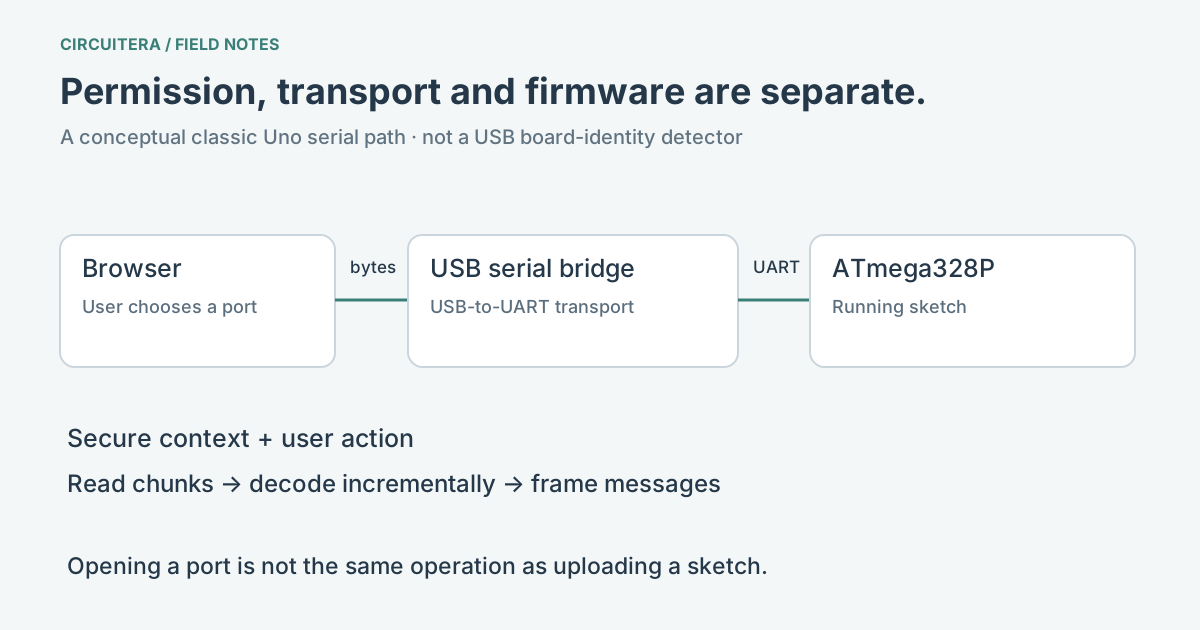
Web Serial lets a permitted website read and write bytes through a serial port exposed by the host system. On a classic Uno, a USB-to-serial bridge connects that host port to the microcontroller’s UART. On a native-USB board such as Leonardo or Micro, the device behavior and reset path differ. The browser does not need to know your sketch’s application protocol to move its bytes.
The Web Serial specification defines the API, while Chrome’s developer guide describes port selection and streams. Hardware access requires a suitable browser and a secure context, normally HTTPS. Check the API and managed-device policy on the actual machine rather than inferring support from a browser name or logo.
Permission starts with a user action
A site normally calls requestPort() from a user action such as clicking Connect. The browser presents the picker; the user chooses the device. A site can ask for previously granted ports, but permission does not establish that a cable is currently connected or that the selected MCU matches a profile.
This distinction is useful for classrooms. A signed-in Circuitera account does not override the operating system, a driver or an administrator’s USB policy. The Chromebook setup guide is the primary setup path. If the picker is empty, follow the port-not-visible guide before changing Arduino code.
Send something that repeats
Use this Uno sketch to make a recurring serial message. Set the monitor to 9600 baud after uploading it to matching hardware. The repeated output is more useful for a connection check than a single setup() message, which might have been sent before the monitor started listening.
unsigned long lastMessage = 0;

void setup() {
  Serial.begin(9600);
}

void loop() {
  const unsigned long now = millis();
  if (now - lastMessage >= 1000UL) {
    lastMessage = now;
    Serial.println("serial link alive");
  }
}
Serial.begin(9600) configures the sketch’s serial interface. For an Uno’s UART bridge path, the receiver must interpret the same baud rate. This does not itself grant browser permission, choose a USB device or begin an upload. See Serial Hello World for a complete existing Circuitera project and Serial Tools for the monitor/plotter workspace.
Streams carry chunks, not complete messages
One browser read can contain half a line, several lines, or bytes that do not represent text at all. A robust monitor keeps an incremental text decoder and buffers partial lines. A binary protocol needs its own framing and validation. A sender should also decide whether a newline is required; typing a command and sending a line terminator are not the same bytes.
A reader or writer can lock a stream. Before another part of the application uses the port, those operations must be stopped and their locks released. That is one reason an upload path must coordinate with a running monitor rather than simply opening another reader beside it.
Opening a port is not uploading a program
An upload operation speaks a bootloader protocol and may reset or re-enumerate the device. Ordinary serial output is whatever your running sketch sends. The same physical connection can serve these different roles at different times. Circuitera hands ownership between monitor and uploader; a failed bootloader handshake is not automatically an actual disconnect.
USB identifiers are hints about a device or bridge, not reliable proof of the exact Arduino model. Keep manual board selection and inspect unknown devices honestly. This matters with clones that share adapters and with native-USB devices that expose a bootloader port after reset.
Keep the permission boundary intact
Connect only the device you intend to use, and close or disconnect when finished. A website with access to a serial device can send the protocol bytes that device accepts, so understand the application before granting permission. Circuitera’s browser/transport software checks do not certify physical upload or serial behavior on your own board. No board permission is needed just to read this article or compile its example.
Sources and verification
Technical references were reviewed for this article. Board behavior is scoped to the named core and profile; follow a component’s actual datasheet when wiring hardware.