

Tested with Circuitera 1.0.0: the article’s complete C++ sketch compiled for Arduino Uno R3 using avr-gcc-wasm@0.2.0 on 2026-10-26 (UTC). No modeled execution is claimed for this article. No physical board was tested.
Measure one complete pulse
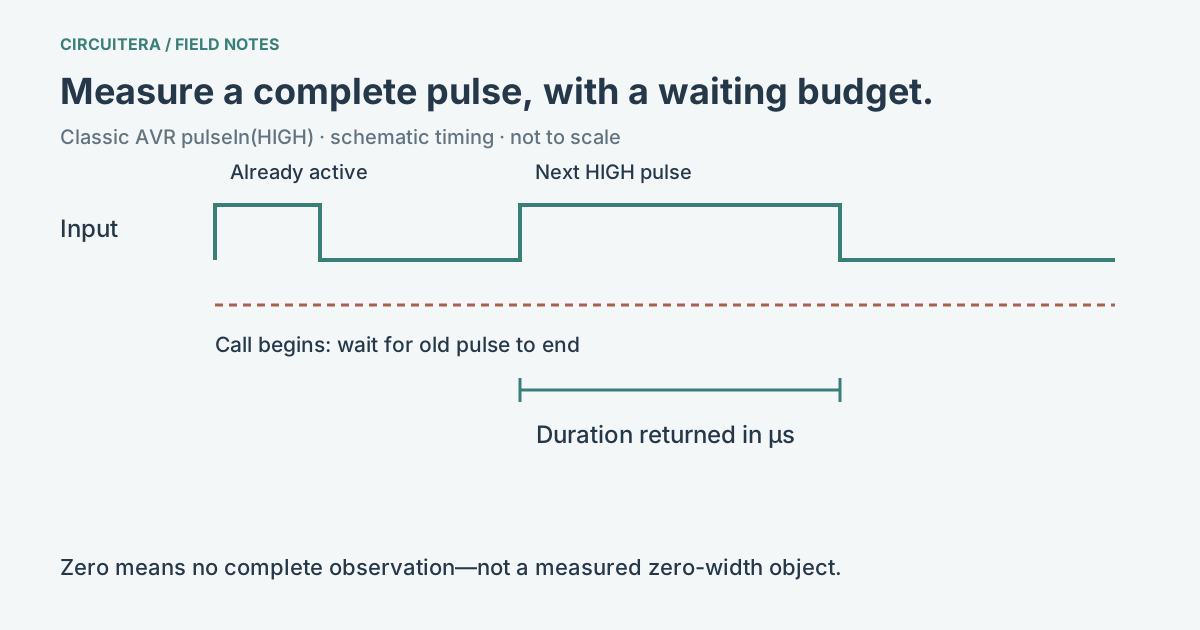
pulseIn(pin, HIGH, timeout) waits for a HIGH pulse and measures how long that requested state lasts. On the classic AVR implementation, an already-active pulse is allowed to finish before the next pulse is measured. The result is an unsigned duration in microseconds. It is not a voltage reading, frequency reading or distance by itself.
The Arduino pulseIn reference describes the interface. This article scopes the behavior to the shipped classic AVR core; consult another core before assuming its timing implementation is identical. The AVR source implementation uses a pulse-counting routine rather than a general background task.
Put a bound on the wait
An input might never change because a sensor is disconnected, a pulse has already passed, or the transmitter is not working. An explicit timeout stops the normal sketch from waiting for the default interval when there is no useful event. For a first sensor test, 30000 microseconds is a deliberate 30 ms budget, not a promise that every device responds within it.
Wire the pulse source to D7 with a common ground, using voltage levels suitable for the Uno. This minimal reader prints either a pulse width or a diagnostic word. It cannot create a pulse on its own.
const byte signalPin = 7;

void setup() {
  pinMode(signalPin, INPUT);
  Serial.begin(9600);
}

void loop() {
  const unsigned long duration = pulseIn(signalPin, HIGH, 30000UL);
  if (duration == 0) {
    Serial.println("no complete pulse");
  } else {
    Serial.println(duration);
  }
  delay(100);
}
The third argument is in microseconds. It limits waiting in this blocking measurement path; it is not a fixed pulse width to match. The AVR routine budgets waiting and counting work, so treat a timeout as a missing complete observation, not as an exact wall-clock guarantee under all interrupt activity.
Zero is a failed observation
If the call returns zero, check whether the pulse started after the call, finished in time and reached the expected pin. Also check the requested polarity. Asking for HIGH on a signal whose useful event is LOW measures the other portion of the waveform. A floating input can be misleading, so make sure the source and ground connection define a real level.
Do not convert zero into “0 cm” for an ultrasonic sensor. That turns an unavailable measurement into an apparently valid obstacle at the sensor face. Keep validity separate from the numeric conversion and choose what your application should do when the observation is missing.
Blocking has a cost
loop() does not continue with its normal next statement while pulseIn() is waiting. A 30 ms timeout is shorter than a second, but it is still a gap in application-level button checks and control updates. A periodic millis() scheduler cannot undo a blocking call placed inside its handler. Use the millis explainer to make that distinction explicit.
For a fast or safety-critical control loop, consider hardware capture or a carefully designed interrupt/state-machine approach for the actual MCU. Those are separate implementations with their own limits. Disabling interrupts casually to improve a measurement can break timing and communications elsewhere.
Give the duration a physical meaning only when justified
With an HC-SR04, a correctly triggered Echo pulse represents a round-trip acoustic timing measurement. The HC-SR04 explanation shows the conversion and why it includes a factor of two. Another sensor may encode something entirely different in pulse width.
The example here is compile-tested. Its generic external pulse source is not claimed as a physical or simulator timing validation. Use the existing ultrasonic project for a supported modeled device, and keep any real-hardware calibration or timing claim separate from that model result.
Sources and verification
Technical references were reviewed for this article. Board behavior is scoped to the named core and profile; follow a component’s actual datasheet when wiring hardware.