

Tested with Circuitera 1.0.0: the article’s complete C++ sketch compiled for Arduino Uno R3 using avr-gcc-wasm@0.2.0 on 2026-10-26 (UTC). The sketch also passed its recorded Uno model checks. No physical board was tested.
The sensor times a round trip
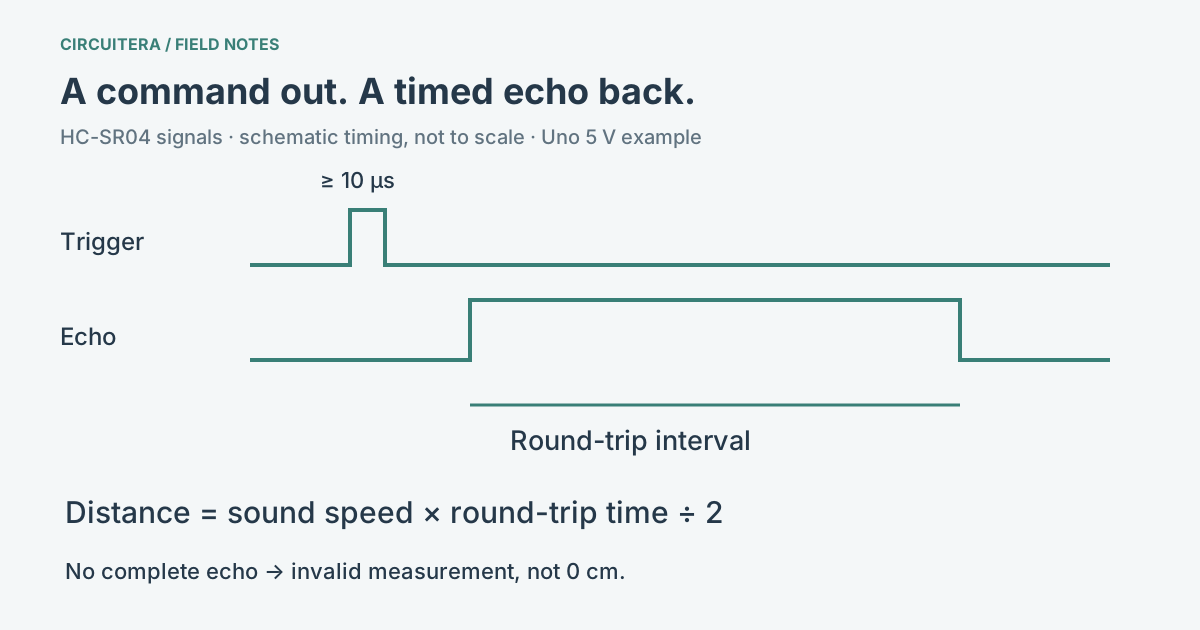
An HC-SR04 sends an ultrasonic burst and listens for a reflection. The sketch asks the module to begin a measurement with Trigger; the module returns a pulse on Echo. The width of that Echo pulse is used as a round-trip time estimate. It is not the time the sketch holds Trigger HIGH.
The module datasheet, attributed to ElecFreaks and hosted by SparkFun, specifies a trigger of at least 10 microseconds and an eight-cycle 40 kHz burst. That describes the referenced module, not every similarly shaped clone. Check the documentation for the unit on your desk rather than assuming a seller’s photograph establishes its electrical behavior.
Why Trigger needs a short HIGH pulse
The HIGH pulse is a start command. The module handles the acoustic transmission; the Arduino is not generating the 40 kHz sound by leaving Trigger HIGH. Beginning with a short LOW state makes the intended transition clear, then a 10 microsecond HIGH request starts the measurement sequence. Keeping Trigger HIGH for the entire time sound travels confuses the command with the result.
In the accompanying diagram the timing is schematic, not to scale. The short Trigger event and the much longer Echo interval serve different purposes. The diagram is an explanation, not a captured oscilloscope trace from physical hardware.
Measure Echo, then convert only a valid result
For an Uno R3, use 5 V and GND for this module, D7 for Trigger and D6 for Echo. The complete ultrasonic tutorial owns the step-by-step wiring instructions and existing simulator launch; this article focuses on what those signals mean. That tutorial has its own matching pin assignment; use D6 for Echo with the sketch below. A module’s 5 V Echo output must not be wired directly into an unspecified 3.3 V input.
const byte triggerPin = 7;
const byte echoPin = 6;

void setup() {
  pinMode(triggerPin, OUTPUT);
  digitalWrite(triggerPin, LOW);
  pinMode(echoPin, INPUT);
  Serial.begin(9600);
}

void loop() {
  digitalWrite(triggerPin, LOW);
  delayMicroseconds(2);
  digitalWrite(triggerPin, HIGH);
  delayMicroseconds(10);
  digitalWrite(triggerPin, LOW);
  const unsigned long echoUs = pulseIn(echoPin, HIGH, 30000UL);
  if (echoUs == 0) {
    Serial.println("no echo");
  } else {
    Serial.println(echoUs / 58.0);
  }
  delay(70);
}
The division gives an approximate distance in centimeters for this common module convention. The delay provides spacing between measurement attempts; it deliberately makes this a simple observation sketch rather than a responsive robot controller. The pulseIn article explains its blocking behavior and timeout result.
Why the formula divides by two
Sound goes from the sensor to the target and back. If you multiply round-trip time by sound speed, you have the total path length; the one-way distance is half of that. The common duration/58 approximation expresses this calculation in microseconds and centimeters using an assumed sound speed.
For example, an Echo width of 5800 microseconds gives about 100 cm with that approximation. It is an arithmetic example, not a calibration result. Air temperature changes sound speed, and the target’s shape and orientation affect whether a useful reflection comes back.
Missing echoes need a different response
An angled, soft, small or distant target may not provide a useful return. Very close objects are also outside the reliable range of a typical module. A zero from pulseIn() means there was no complete observation within the chosen budget; it does not mean the distance is zero. Check the pin assignment, common ground and target before assuming the conversion formula is wrong.
Keep readings far enough apart for the previous acoustic event to settle. If multiple sensors are present, their bursts can interfere, so triggering them together is not a reliable way to make a wide-angle distance array. A moving robot also needs an explicit policy for stale or invalid measurements.
Use the model to understand signals
Circuitera’s Uno simulation can exercise the supported ultrasonic model and the article sketch. The model is useful for following pin assignments, serial values and timeout branches. It does not reproduce acoustic reflections, environmental noise or a clone’s electrical characteristics. Real range, accuracy and safe behavior require testing the actual installation.
Sources and verification
Technical references were reviewed for this article. Board behavior is scoped to the named core and profile; follow a component’s actual datasheet when wiring hardware.