

Tested with Circuitera 1.0.0: the article’s complete C++ sketch compiled for Arduino Uno R3 using avr-gcc-wasm@0.2.0 on 2026-10-26 (UTC). The sketch also passed its recorded Uno model checks. No physical board was tested.
A switched pin, not a smaller voltage
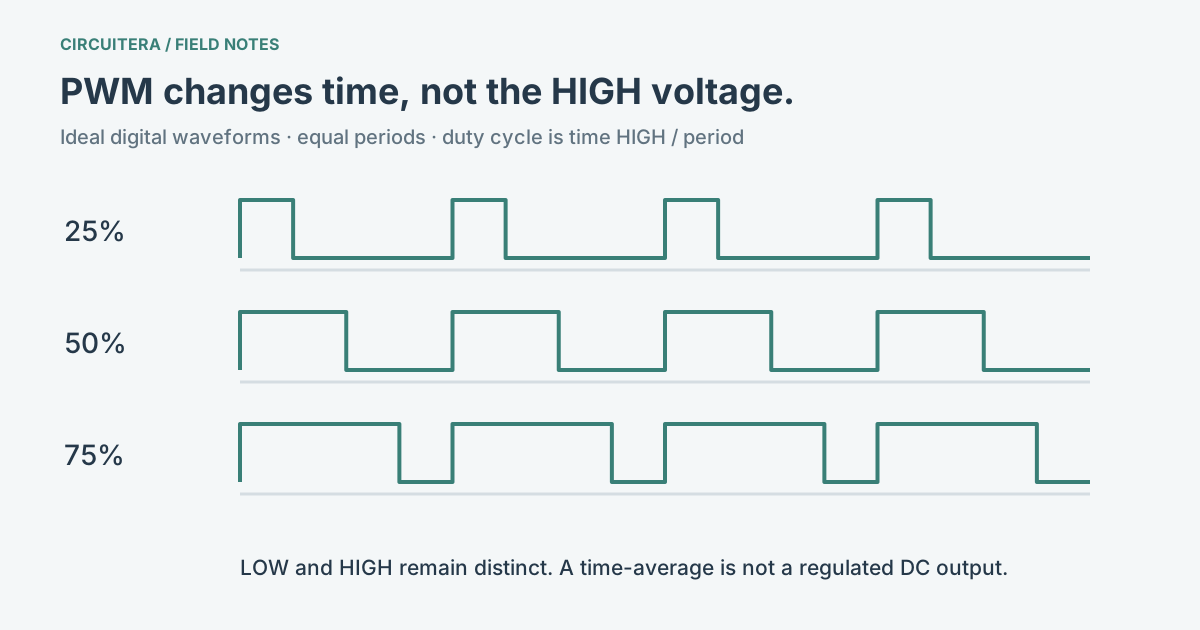
On an Uno R3, PWM repeatedly switches a digital output between LOW and HIGH. Duty cycle is the fraction of each period spent HIGH. A 25% duty cycle spends roughly one quarter of the period HIGH; a 75% duty cycle spends roughly three quarters HIGH. The voltage at the pin is still switching, even when an LED appears steadily dimmed.
An LED responds quickly, but your visual system averages rapid changes. Increasing the HIGH portion usually makes it look brighter. Perceived brightness is not linear, so a half-scale value need not look half as bright. This is why PWM is useful for fading without making the pin produce a continuously adjustable voltage.
For an ideal 0–5 V waveform, a 50% duty cycle has a time-average of about 2.5 V. That does not turn the pin into a regulated 2.5 V supply. A filter and a suitable load change what a measurement shows; neither is present in a bare output pin.
Use a pin with a timer output
The classic Uno R3 exposes PWM on D3, D5, D6, D9, D10 and D11. The Arduino analogWrite reference lists board-specific pins and default frequencies. Check the Uno reference when wiring; the word “analog” in the function name does not mean you should choose an analog input.
The usual AVR range is 0–255: zero requests LOW, 255 requests HIGH, and values between them select timer duty cycles. Do not depend on PWM behavior from an arbitrary non-PWM pin. The classic AVR core can fall back to a digital threshold there, which produces an abrupt change rather than a fade.
Hold one brightness before writing a fade
For this small test, connect D9 through a current-limiting resistor to an LED anode, then connect the cathode to GND. Disconnect power while wiring. The existing Fade project provides a complete circuit and changing-brightness example; this sketch deliberately holds one value so you can inspect what 64 does.
const byte ledPin = 9;

void setup() {
  pinMode(ledPin, OUTPUT);
  analogWrite(ledPin, 64);
}

void loop() {
  // The timer keeps generating PWM without repeated writes.
}
64 is roughly one quarter of the available scale. Try 32, 128 and 224, verifying each change. If the LED only turns on and off, first check the selected pin and the actual board profile. If it never lights, inspect LED polarity, its resistor and the ground connection before changing timing code.
Frequency and duty cycle solve different problems
Duty cycle changes the HIGH proportion; frequency changes how often the pattern repeats. Calling analogWrite() with a new value changes duty cycle, not a general frequency setting. Uno pins use different timers, so their default frequencies are not all identical. Timer reconfiguration or a library that owns the same timer can also change the result; consult the AVR core implementation before writing timer registers.
A hobby servo expects timed control pulses, so “50% PWM” is not a substitute for the Servo library. A motor needs an appropriate driver and power supply; an Arduino I/O pin is not a motor power output. The Servo Sweep project is a separate control example, not evidence that analogWrite() drives a servo correctly.
Inspect the model, then check the hardware
Open the Fade project in Circuitera’s Uno simulator to compare duty settings. Its modeled LED response helps explain the code; it does not measure a real waveform, current or temperature. A real oscilloscope or logic analyzer can reveal the HIGH and LOW portions on your physical pin. Circuitera’s compile result proves that this example builds for the selected profile, not that a connected board was uploaded or electrically tested.
Try the real Fade project
Load the existing Circuitera Uno workspace only when you choose. It creates a separate local project and needs compiler assets when you press Run. The changing-duty Fade project is a companion experiment to the fixed-duty sketch above.
Sources and verification
Technical references were reviewed for this article. Board behavior is scoped to the named core and profile; follow a component’s actual datasheet when wiring hardware.