

Tested with Circuitera 1.0.0: the article’s complete C++ sketch compiled for Arduino Uno R3 using avr-gcc-wasm@0.2.0 on 2026-10-26 (UTC). The sketch also passed its recorded Uno model checks. No physical board was tested.
Give an open switch a defined level
A disconnected input is not automatically LOW. The input circuitry can respond to noise and nearby signals because nothing is setting a reliable voltage. A pull-up provides a weak connection to the positive supply, so an otherwise open input has a defined HIGH level. It does not mean that a button is pressed.
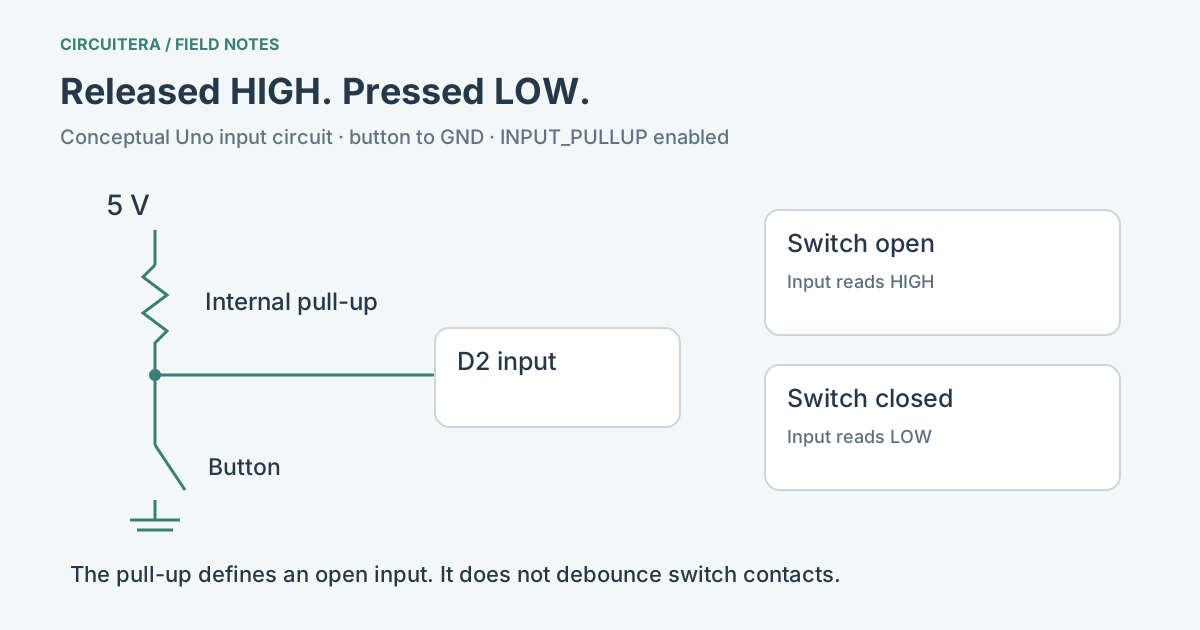
On the classic Uno, pinMode(2, INPUT_PULLUP) enables the microcontroller’s internal pull-up on D2. Connect a switch between D2 and GND. With the switch open, the pull-up holds the input HIGH. Closing the switch connects it to ground, so the input reads LOW. The Arduino pinMode documentation defines the mode; the exact resistor is an internal device characteristic, not a precise value selected by your sketch.
Read “pressed,” not just “HIGH”
Giving the physical meaning a name makes the inverted logic easier to follow. This example turns on the Uno’s onboard LED while the switch is pressed. It needs only the button connection between D2 and GND; the built-in LED is already part of the board.
const byte buttonPin = 2;

void setup() {
  pinMode(buttonPin, INPUT_PULLUP);
  pinMode(LED_BUILTIN, OUTPUT);
}

void loop() {
  const bool pressed = digitalRead(buttonPin) == LOW;
  digitalWrite(LED_BUILTIN, pressed ? HIGH : LOW);
}
Released means the switch is open and the input is HIGH. Pressed means the switch is closed and the input is LOW. Writing this comparison once is clearer than scattering inverted assumptions throughout a larger program. The Button LED project gives you a matching Circuitera circuit to inspect and run.
Where the current goes
When the button is pressed, a small current flows from the supply through the pull-up and the switch to ground. The resistor limits that current; the input is not an unprotected direct wire from the supply. This is a signal circuit, not a way to power another component.
Do not configure the same pin as a HIGH output and then short it to ground with a button. That is a different electrical situation. Keep this pin in input mode, and disconnect power before changing the circuit. A pull-up for a logic input also does not replace an LED’s current-limiting resistor.
A stable level does not remove contact bounce
A mechanical switch can open and close several times during one press. The pull-up defines the open state; it does not turn those transitions into one clean event. The simple LED example reflects the current input level and is a good first check. A counter or toggle needs edge detection and debouncing so one physical press does not become several actions.
Before adding a debounce algorithm, verify the raw circuit. A four-legged tactile switch often has two terminals permanently connected on each side. Choosing two legs on the same connected side can make the input look permanently pressed. Inspect the component’s contact arrangement instead of relying on how it sits in a drawing.
When the internal resistor is not enough
A long wire or a noisy environment may need a deliberately designed external pull-up, filtering or another input interface. The internal resistor has a tolerance and is not a universal cure for interference. Follow the electrical requirements of any sensor connected to the input; an open-drain bus, a plain button and a push-pull sensor are not interchangeable.
If a pin still changes with no press, check the common ground, the actual switch contacts and whether the selected mode reached the board. The digital versus analog input explainer helps distinguish a floating reading from a useful measurement. In Circuitera, compilation and modeled button behavior can be checked separately; physical wiring and upload remain separate tests.
Sources and verification
Technical references were reviewed for this article. Board behavior is scoped to the named core and profile; follow a component’s actual datasheet when wiring hardware.