

Tested with Circuitera 1.0.0: the article’s complete C++ sketch compiled for Arduino Uno R3 using avr-gcc-wasm@0.2.0 on 2026-10-31 (UTC). No modeled execution is claimed for this article. No physical board was tested.
A small project becomes difficult to debug when several explanations fit the same symptom. An LED that stays dark could have reversed polarity, a missing ground, the wrong pin, firmware that never reaches the output statement or a board that keeps resetting. Changing all five possibilities at once may produce a working circuit without explaining why it works.
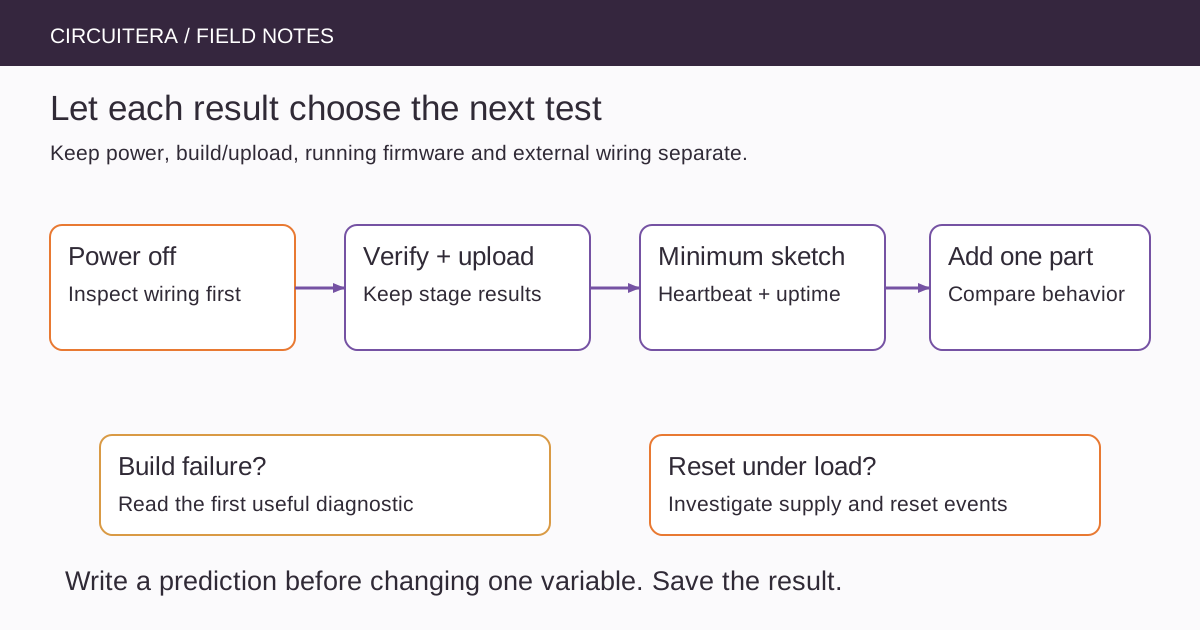
A repeatable isolation workflow narrows the question before changing the design. The goal is not to collect a longer checklist. It is to arrange tests so that each result eliminates a plausible class of faults, while preserving enough notes to reproduce the failure later.
Describe the failure as an observation
Write what happened, under which conditions and what you expected. “The LED on D9 stays dark after a press” is more useful than “the Arduino is broken.” Include the exact board profile, sketch revision, wiring revision, power arrangement and whether the problem occurs before or after a particular action.
Also distinguish evidence from interpretation. A successful compile means the source built for a target. It does not mean that the correct board received that firmware, that the upload finished or that an external component is wired correctly. The testing-methodology page explains these boundaries in Circuitera's reports.
Check the unpowered circuit first
Disconnect USB and other supplies before changing wires. Look for reversed supply connections, misplaced breadboard rows, loose contacts, component polarity and unintended shorts. Verify continuity only with the circuit unpowered and with the meter connected for the intended measurement mode.
Trace ground explicitly. A signal from one board is not automatically meaningful to another floating circuit. If there are separate motor and logic supplies, follow the driver documentation for the required reference and current-return arrangement. Do not join unknown supply outputs simply to make the colors on a diagram match.
Establish a minimum running sketch
Remove external loads that are not needed for the test. The complete Uno R3 sketch below uses its onboard LED and periodic serial output as independent clues that loop() continues to run. It is deliberately small and contains no sensor library, network operation or long application-level delay.
unsigned long toggledAt = 0;
unsigned long reportedAt = 0;
bool on = false;

void setup() {
  pinMode(LED_BUILTIN, OUTPUT);
  Serial.begin(9600);
  Serial.println(F("Diagnostic sketch started"));
}

void loop() {
  const unsigned long now = millis();
  if (now - toggledAt >= 250UL) {
    toggledAt = now;
    on = !on;
    digitalWrite(LED_BUILTIN, on ? HIGH : LOW);
  }
  if (now - reportedAt >= 1000UL) {
    reportedAt = now;
    Serial.print(F("uptime_ms="));
    Serial.println(now);
  }
}
Select the matching board, Verify, upload through the supported path and open Serial Monitor at 9600 baud. Keep the build and upload results separate in your notes. The initial message may be missed if the monitor starts later; the repeating uptime report is therefore the stronger continuing clue.
Let the result choose the next branch
If compilation fails, read the first useful diagnostic and reduce the source until it builds. A missing declaration or header is a software/build issue, not evidence that a breadboard rail needs bridging. If compilation succeeds but upload fails, investigate the port, target selection and transport with the existing upload guide.
If the diagnostic firmware runs reliably without external hardware, reconnect one low-voltage subsystem at a time. If it restarts as soon as a load begins, follow the reset investigation. If the heartbeat continues while an external output fails, focus on that output path and the statements controlling it rather than assuming the entire MCU stopped.
Divide an input-to-output chain at a useful point
Suppose a light sensor should activate an LED. First print the raw sensor value without a threshold or animation. Then command a known fixed output independently of the sensor. Finally reconnect the decision logic. These tests separate acquisition, interpretation and actuation instead of asking one complex sketch to prove all three at once.
For a digital input, use a known defined level rather than a disconnected pin. For an LED output, verify polarity and an appropriate current-limiting resistor. Never use an unprotected short to a supply rail as a general way to force an output state.
Use expected ranges and validity states
A measurement can be missing, saturated, stale or outside the intended range. Those conditions deserve explicit branches. Turning every failed pulse measurement into zero distance makes troubleshooting harder because it converts an error into an apparently valid physical observation.
The sensor-readings article offers a min/max logging method for analog inputs. For other sensors, use the device's documented status information. A threshold that accidentally compensates for incorrect wiring may appear to solve one test case while failing everywhere else.
Keep experiments reversible
Change one variable and write down the prediction before testing. If replacing a jumper changes the symptom, restore the old arrangement only when safe and check whether the failure returns. If removing a library fixes timing, inspect what that library does rather than permanently deleting unrelated features without a causal explanation.
Keep a known-good minimal sketch and an exported project copy. Circuitera's project tools can help preserve revisions, while the simulator can test supported modeled logic. A simulator does not reproduce every real connector, supply transient or peripheral behavior, so a clean model result narrows the question without declaring the hardware healthy.
Stop when the evidence supports a cause
A useful final note says which test failed, what changed and which comparison confirmed the diagnosis. It might identify a split rail, a wrong module address or a loop path that blocks too long. That record is reusable on the next project and more valuable than a circuit that works once after an unexplained collection of edits.
Sources and verification
Technical references were reviewed for this article. Board behavior is scoped to the named core and profile; follow a component’s actual datasheet when wiring hardware.