

Tested with Circuitera 1.0.0: the article’s complete C++ sketch compiled for Arduino Uno R3 using avr-gcc-wasm@0.2.0 on 2026-10-31 (UTC). No modeled execution is claimed for this article. No physical board was tested.
Two jumpers can look adjacent while remaining electrically separate. Two component legs can look comfortably spaced while already sharing a hidden metal contact. A breadboard is useful because it hides reusable connections beneath its holes, but that same convenience makes visual guesses unreliable.
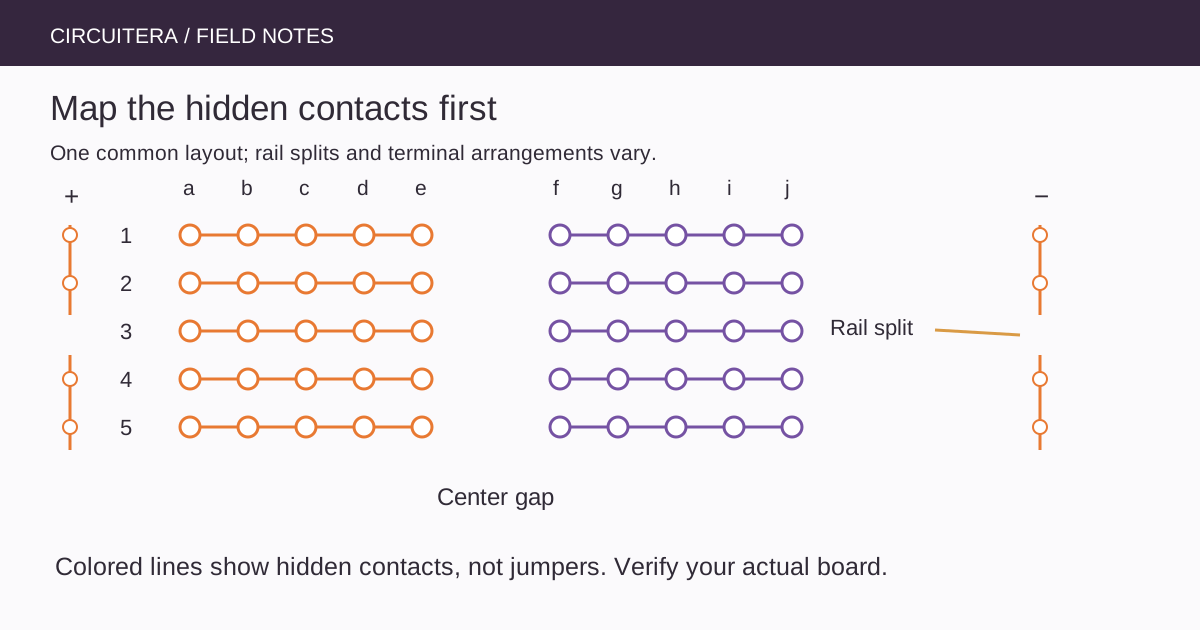
The right starting point is a connectivity map, not the printed grid alone. The diagram above shows one common solderless layout. Treat it as a pattern to verify on your actual board, because rail splits, labels and contact arrangements differ between products.
Follow the terminal strip under one row
On a common five-hole terminal strip, holes a through e at one numbered position share a contact. Across the center channel, f through j at that position commonly share another contact. The center gap separates those two groups. Moving one position along the numbered direction usually takes you to a different contact strip.
That means a resistor with both legs in the same connected five-hole group is bypassed electrically. The resistor body may be visible, but the hidden metal already joins its terminals. Put the legs in different nodes so current must actually pass through the component.
The center gap is useful, not magical
A dual-inline integrated circuit is often placed across the channel so opposing pins do not share a terminal group. This placement does not prove that every pin has the right signal or supply connection. Read the package orientation, pin-one indicator and the device's pinout before wiring it.
Four-legged tactile switches create another trap. Some pairs of legs are internally joined even when the button is not pressed. A switch spanning the gap can still be wired incorrectly if the selected legs belong to the same permanent pair. Establish the contact arrangement with the component documentation or an unpowered continuity check.
Long rails can stop halfway
Power rails are convenient distribution conductors. The colored stripe is a label, not a conductor and not an electrical guarantee. A rail may be split near its midpoint; the two sides of the board may also be independent. Connecting 5 V at one end does not prove that every red-marked hole receives it.
With the board unpowered, check the rail sections you intend to use. If a split needs bridging, add an explicit jumper between the intended segments. Avoid blindly joining every rail: one may be assigned to a different supply voltage. Label separate voltage domains clearly and keep their permitted signal interfaces in mind.
Use a meter with power disconnected
A continuity check asks whether there is a low-resistance path between points. Disconnect supplies and USB before using that mode. Do not test continuity on a powered circuit, and do not confuse a meter's current-input socket with its normal voltage/continuity connection.
Check an empty five-hole group, the neighboring numbered group, the opposite side of the center gap and each rail segment. Record the actual result. A meter may briefly beep while a capacitor charges, so a sound alone is not a complete explanation of a populated circuit. Remove or account for connected components when interpreting the path.
Make a simple logic connection test
After mapping the unpowered board, the following Uno R3 sketch can report whether a chosen contact reaches ground. Connect D2 to the test point and connect the intended ground node to Uno GND. Use it only on an otherwise passive, unpowered contact arrangement; do not probe another powered circuit or an unknown voltage with an input pin.
unsigned long reportedAt = 0;

void setup() {
  pinMode(2, INPUT_PULLUP);
  Serial.begin(9600);
}

void loop() {
  const unsigned long now = millis();
  if (now - reportedAt < 200UL) return;
  reportedAt = now;
  Serial.println(digitalRead(2) == LOW ? "path to GND" : "open path");
}
Set Serial Monitor to 9600 baud. Move the passive jumper between a confirmed ground-connected group and an isolated group, disconnecting power before changing the arrangement. The internal pull-up gives an open input a defined HIGH. This is a logic demonstration, not a calibrated resistance meter or proof that a contact will carry a motor's current reliably.
Give each circuit node a name
Before placing a large circuit, make a short list of nodes: supply, ground, sensor output, input pin and so on. Translate each schematic node into one or more verified breadboard groups connected by explicit jumpers. A schematic line means electrical connectivity; the physical wire's shape on the board is secondary.
The Button LED project and potentiometer project are good small circuits for practicing that translation. The existing pull-up article explains the input behavior; it does not replace checking the breadboard contacts beneath the button.
Suspect mechanics when touching changes the fault
A loose jumper, a damaged spring contact or an unsuitable component lead can create an intermittent connection. If gently moving one wire changes the symptom, inspect that connection instead of immediately adding software filtering. Avoid forcing oversized wires or thick component leads into contacts, since that can damage the connector for later use.
Long, looping jumpers also make a circuit harder to inspect and can pick up interference. Keep the layout understandable, keep switching-current paths away from sensitive inputs and use components within their ratings. A solderless breadboard is not a suitable substitute for a properly designed high-current or mains-voltage assembly.
Finish with a map you can explain
A successful breadboard check produces a repeatable statement about which holes connect and which remain isolated. It is stronger than “the wire looks right.” For a stubborn circuit, use the isolation workflow to test one section at a time. Circuitera's diagrams and simulator can help you reason about the intended nodes, while the actual board's continuity, contact quality and electrical behavior still require physical checks.
Sources and verification
Technical references were reviewed for this article. Board behavior is scoped to the named core and profile; follow a component’s actual datasheet when wiring hardware.