

Tested with Circuitera 1.0.0: the article’s complete C++ sketch compiled for Arduino Uno R3 using avr-gcc-wasm@0.2.0 on 2026-10-31 (UTC). No modeled execution is claimed for this article. No physical board was tested.
A light sensor reports a steady value until a small motor starts. A temperature module changes its answer when you reconnect USB. A distance reading occasionally becomes zero. These symptoms look similar on a screen, but they do not necessarily have the same cause. Filtering every result can hide useful evidence and make a broken measurement appear reassuringly smooth.
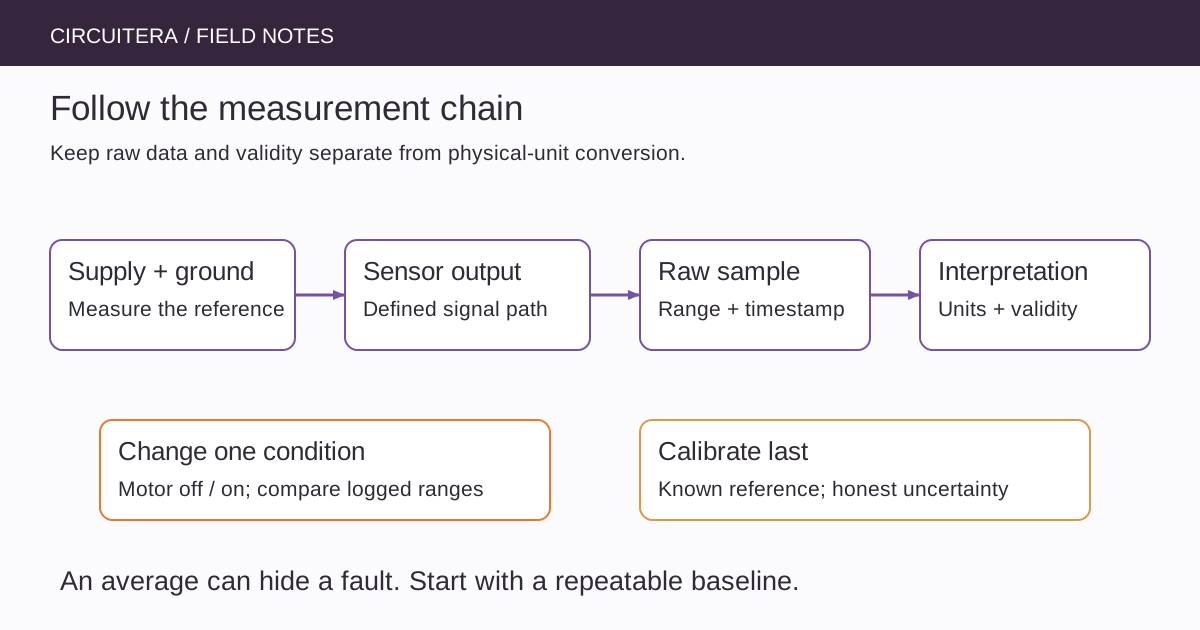
Start by deciding what was actually measured. A raw ADC code, a timed pulse and an I²C register are different observations. Preserve the raw result, its timestamp and any validity flag before converting it into a physical unit. This article concentrates on diagnosing the measurement chain; the existing digital versus analog input article explains the individual read functions.
Establish a deliberately boring baseline
Disconnect power before changing wiring. Record the exact board, sensor module, signal pin and supply voltage. Check the module's actual pin labels rather than trusting a photograph of a similar breakout. Some boards accept a wider supply voltage through a regulator while their signal pins still require lower logic levels.
For an Uno R3 analog test, start with a potentiometer connected between 5 V and GND, with its wiper on A0. This provides an adjustable, understandable input before the real sensor is involved. Keep the knob stationary. If that baseline is unstable, adding the sensor's conversion formula will not solve the underlying problem. The potentiometer project supplies a matching reference circuit.
Look at a range, not just the latest number
The following complete Uno R3 sketch takes one A0 sample every 10 ms and prints the minimum, maximum and mean after 100 samples. It does not claim that the samples are statistically independent or that averaging makes the measurement calibrated.
unsigned long sampledAt = 0;
unsigned long total = 0;
unsigned int count = 0;
int lowest = 1023;
int highest = 0;

void setup() {
  Serial.begin(9600);
}

void loop() {
  const unsigned long now = millis();
  if (now - sampledAt < 10UL) return;
  sampledAt = now;
  const int value = analogRead(A0);
  if (value < lowest) lowest = value;
  if (value > highest) highest = value;
  total += value;
  if (++count == 100) {
    Serial.print(lowest);
    Serial.print(',');
    Serial.print(highest);
    Serial.print(',');
    Serial.println(total / 100.0);
    count = 0;
    total = 0;
    lowest = 1023;
    highest = 0;
  }
}
Set Serial Monitor to 9600 baud. The total fits comfortably in an unsigned long for this window. A stable mean with occasional large peaks tells a different story from a mean that moves whenever the supply changes. Save a short log for each deliberate wiring or power change instead of relying on memory.
A floating input has no meaningful zero
An unplugged analog input can react to nearby wiring, charge left in the ADC sampling circuit and your hand. A wandering number is not evidence that the disconnected sensor is transmitting something. Restore a defined input before interpreting it. Do not connect an unknown external supply to the pin merely to make the reading stop moving.
For a digital switch, a suitable pull resistor defines an open state. For an analog sensor, a pull resistor can change the measurement by loading the source, so the digital-button remedy is not automatically appropriate. Consult the sensor's output specification and the MCU input requirements.
Compare the signal with its reference
An ADC reports a ratio relative to its reference. If an independently regulated sensor output stays constant while the Uno supply falls, the ADC code can rise because the reference changed. A potentiometer powered from that same reference is approximately ratiometric, so both numerator and denominator may move together instead.
This distinction explains why measuring only the sensor output is sometimes insufficient. Measure the relevant low-voltage supply and ground relationship as well. A handheld meter can reveal a steady offset, but it may miss brief dips. An oscilloscope is better suited to short transients when used with appropriate probes and safe ground connections.
Change one noise source at a time
Compare readings with the motor disconnected, then with its driver powered, then while it runs. Keep signal wiring away from switching-current paths. Check whether a shared ground wire carries both sensor return current and motor current; its voltage drop can shift the sensor's apparent ground.
Decoupling and filtering belong to a circuit design, not a universal bag of capacitor values. Follow the sensor and driver recommendations. Never power a motor directly from an I/O pin. If the board itself restarts, move to the separate unexpected-reset investigation rather than treating each restart as another noisy sample.
Sampling can create a convincing false pattern
A periodic disturbance sampled at another periodic rate can appear as a slow changing signal. Merely taking more samples at the same interval may reproduce that pattern. Try a different interval as a diagnostic, then choose a sampling strategy based on the real signal bandwidth and any required analog filtering.
Read the sensor's conversion timing too. Repeatedly requesting a register before a conversion finishes can return stale data. Switching between high-impedance analog sources can expose settling limitations. None of these faults is fixed simply by printing additional decimal places.
Calibrate after the chain behaves consistently
Use known reference conditions appropriate to the sensor. Record the reference instrument, units, range and uncertainty. A two-point correction may address offset and scale, but it does not establish linearity everywhere or recover information lost to saturation. Keep a clearly marked out-of-range or invalid state instead of quietly clamping every bad observation to a plausible number.
Reproduce the baseline in Circuitera's IDE, compare the code path with a supported simulator model, and then check the actual installation. Compilation checks syntax and linking; simulation checks only the modeled behavior. A useful diagnosis ends with a specific cause, a repeatable comparison and an honest statement of what remains unmeasured.
Sources and verification
Technical references were reviewed for this article. Board behavior is scoped to the named core and profile; follow a component’s actual datasheet when wiring hardware.