

Tested with Circuitera 1.0.0: the article’s complete C++ sketch compiled for Arduino Uno R3 using avr-gcc-wasm@0.2.0 on 2026-10-31 (UTC). No modeled execution is claimed for this article. No physical board was tested.
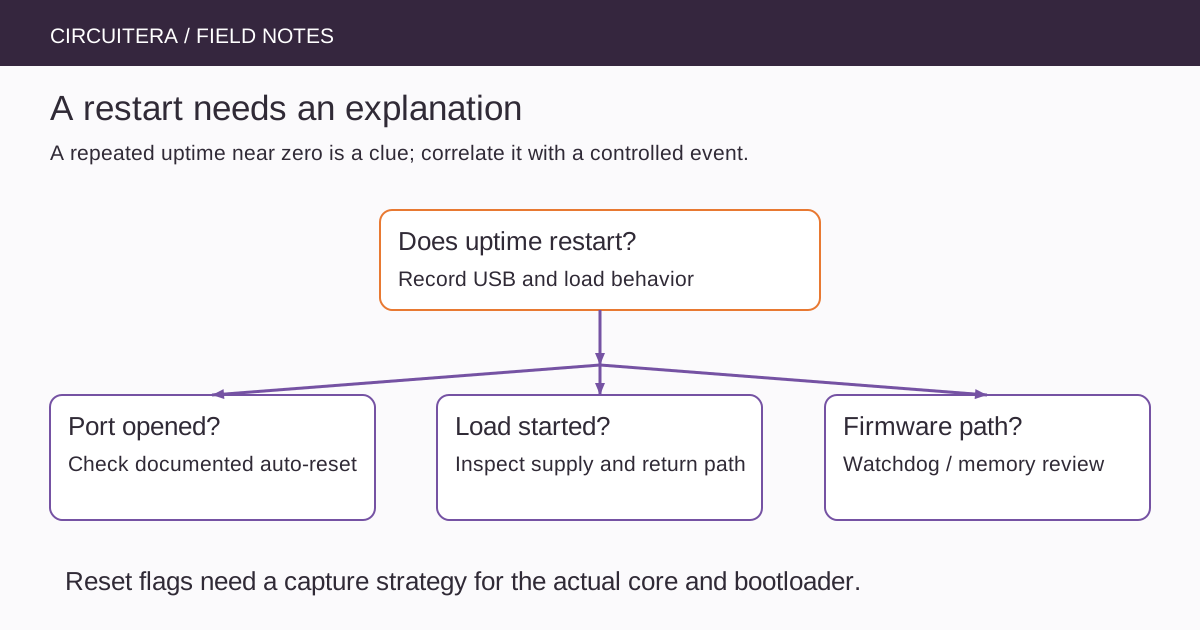
A project starts normally, moves a servo and then prints its startup message again. The source still compiles. Another project appears to restart whenever Serial Monitor opens. These are different clues, even though both may look like “the code began again.” Treating every restart as the same software bug wastes useful information.
This investigation concerns low-voltage educational projects, especially the classic Uno R3. Other boards have different reset circuitry, watchdog behavior and power arrangements. Keep mains wiring, improvised battery charging and unknown high-energy supplies outside this experiment.
Establish whether execution really restarted
A repeated startup message suggests a restart, but a terminal reconnect can also replay or hide output. Add an uptime report that continues throughout normal operation. The complete Uno R3 sketch below prints elapsed milliseconds and toggles the onboard LED without deliberately resetting the board or enabling a watchdog.
unsigned long lastReport = 0;
bool ledOn = false;

void setup() {
  Serial.begin(9600);
  pinMode(LED_BUILTIN, OUTPUT);
  Serial.println(F("BOOT: uptime begins again"));
}

void loop() {
  const unsigned long now = millis();
  if (now - lastReport >= 500UL) {
    lastReport = now;
    ledOn = !ledOn;
    digitalWrite(LED_BUILTIN, ledOn ? HIGH : LOW);
    Serial.print(F("uptime_ms="));
    Serial.println(now);
  }
}
Set Serial Monitor to 9600 baud after uploading to matching hardware. Record whether uptime returns near zero, whether the USB device disconnects and what physical event happened immediately beforehand. A millisecond counter also wraps after a long enough run, so a rollover alone should not be mislabeled as a reset.
Separate port-open reset from a failing supply
The classic Uno R3 includes an automatic reset path associated with its USB serial bridge. A change in the relevant control signal when a host opens a port can restart the ATmega328P. Uploading normally relies on a controlled reset sequence as well. That behavior differs from a board that restarts repeatedly while the port remains open and a motor is running.
Do not remove reset circuitry as the first experiment. Keep the monitor state consistent during a test and record whether merely opening it reproduces the event. Native-USB boards and clones may behave differently, so a result on one board is not a universal rule for all Arduino products.
Inspect the load's current path
A motor's starting current or a servo's load change can pull a shared supply below the level needed for reliable logic operation. The small average current seen on a meter may conceal a short dip. Cable resistance, a weak connector, a breadboard rail and regulator limits can all contribute.
An I/O pin is not a motor supply. Use an appropriate driver and a supply arrangement designed for the load, with the required reference connection and protection described by the driver manufacturer. Never join two supply outputs indiscriminately, and do not assume that a powered USB port can support every attached actuator.
Brownout protection depends on configuration
AVR devices provide reset mechanisms including power-on, external reset, watchdog reset and brownout reset. Brownout protection responds to supply voltage according to the device's configuration. The existence of that feature does not mean every board uses the same threshold or that its fuse configuration is known from a product-family name.
Lowering a brownout threshold or disabling protection is not a general cure for a weak supply. It can allow execution under unsuitable conditions rather than fix the cause. Establish the actual board/core setup and permitted operating conditions before changing configuration that affects startup or reliability.
Switching loads can inject more than a voltage dip
Inductive loads and fast current changes can disturb nearby signals and ground references. Suitable drivers, correctly designed flyback paths where required, local decoupling and sensible return-current routing matter. Follow the actual component documentation rather than copying an arbitrary capacitor value from another project.
For an initial comparison, disconnect the actuator and run only the diagnostic firmware. Then reconnect the driver and load in documented stages. If the fault occurs only during a specific movement, preserve that condition in the notes; replacing every cable and rewriting the scheduler at once makes the comparison less informative.
Watchdogs need deliberate servicing rules
A watchdog can restart firmware that fails to service it within the configured interval. It is useful when designed as part of a recovery policy, but it can also make a blocking call or an unexpected loop look like an electrical reset. Determine whether the application, bootloader or a library enabled one before adding a second watchdog example.
Reset-cause registers can help in a carefully designed firmware startup path. On AVR, however, startup code or the bootloader may handle or clear flags before setup() reads them. A casual MCUSR print inside setup() is not guaranteed to preserve the original cause. Use a documented capture strategy for the exact bootloader and core before interpreting flags as forensic evidence.
Remember faults that corrupt memory
An out-of-bounds write, stack exhaustion or another memory error can alter execution without a clean hardware-reset diagnosis. If power and reset-line behavior look consistent, reduce the sketch and inspect array bounds, buffer lengths and allocation lifetimes. The Uno SRAM budget provides a concrete way to start that review.
A repeated restart is not proof that a program needs more delay. Adding waits can merely change when a load activates or when a corrupting path runs. Keep the test sequence controlled so that timing changes do not masquerade as an explanation.
Record what the instruments can establish
Measure relevant low-voltage rails under the failing load with suitable equipment. A meter can establish a sustained voltage problem; brief transients may need an oscilloscope and a careful probing arrangement. Do not connect an instrument's grounded lead to an arbitrary circuit node or exceed its input ratings.
Compile the diagnostic in Circuitera, use Serial Tools to observe supported hardware and follow the isolation workflow. No physical reset capture is claimed here. The useful endpoint is a reproducible cause and a documented fix, with remaining uncertainty stated explicitly.
Sources and verification
Technical references were reviewed for this article. Board behavior is scoped to the named core and profile; follow a component’s actual datasheet when wiring hardware.