

Tested with Circuitera 1.0.0: the article’s complete C++ sketch compiled for Arduino Uno R3 using avr-gcc-wasm@0.2.0 on 2026-10-31 (UTC). No modeled execution is claimed for this article. No physical board was tested.
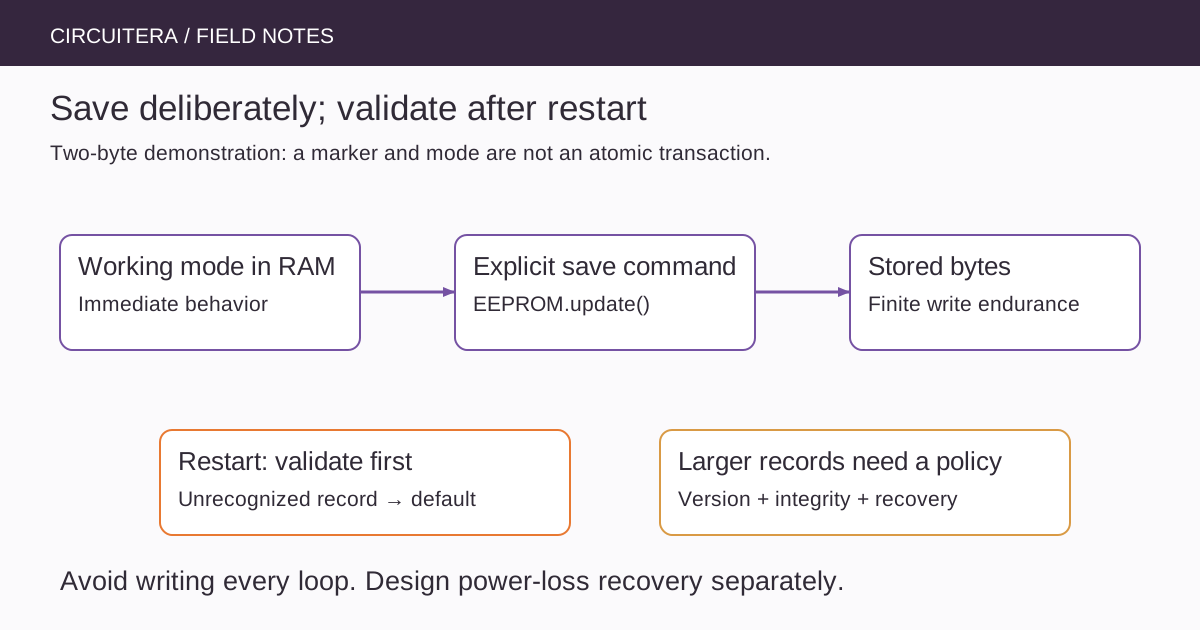
A project remembers its operating mode until power is removed. The first attempted fix is often to write that mode to EEPROM on every pass through loop(). It works during a quick demonstration, but it turns a rarely changing setting into a stream of unnecessary nonvolatile writes. Persistence should follow the meaning of a user action, not the speed of the processor.
This guide is about the classic Uno R3's EEPROM and the Arduino AVR EEPROM library. It is not an extension of the compilation explainer: the question here is how running firmware stores a small setting and decides whether it can trust the value on the next boot.
Choose what actually needs to survive
A selected operating mode, calibration version or user-approved threshold may deserve persistence. A live sensor sample, animation position or temporary counter often does not. Write down the expected save frequency and the behavior after an unexpected power interruption before choosing a storage layout.
The ATmega328P has 1 KB of EEPROM, distinct from its SRAM and program flash. Its documented endurance is finite, with a specified minimum of 100,000 EEPROM write/erase cycles under the datasheet's conditions. That figure is not a timer-based guarantee for a whole product, and deliberately exhausting a cell is not a useful classroom experiment.
Update only when a value changes
EEPROM.update(address, value) compares the existing byte and avoids rewriting an unchanged value. This reduces avoidable writes; it does not spread changed writes across multiple cells or make a multi-byte record atomic. EEPROM.put() uses update semantics for its bytes in the AVR library, but a larger object still needs a defined format and validation policy.
For a first example, use a one-byte mode with an explicit save command. The following Uno R3 sketch uses EEPROM addresses 0 and 1. Address 0 is a small format marker; address 1 stores mode zero or one. Do not run it over addresses already assigned to another application without exporting or documenting that application's settings first.
#include <EEPROM.h>
const byte marker = 0xA6;
byte mode = 0;

void setup() {
  Serial.begin(9600);
  if (EEPROM.read(0) == marker && EEPROM.read(1) <= 1) {
    mode = EEPROM.read(1);
  }
  pinMode(LED_BUILTIN, OUTPUT);
  Serial.println(F("Send 0 or 1 to change; s to save."));
}

void loop() {
  if (Serial.available()) {
    const char command = Serial.read();
    if (command == '0' || command == '1') {
      mode = command - '0';
    } else if (command == 's') {
      EEPROM.update(1, mode);
      EEPROM.update(0, marker);
      Serial.println(F("Save command finished."));
    }
  }
  digitalWrite(LED_BUILTIN, mode ? HIGH : LOW);
}
Upload to matching hardware, open Serial Monitor at 9600 baud and send 1. The onboard LED changes immediately, but that change is still only in RAM. Send s to request persistence. A newline sent by the monitor is ignored because it matches none of the commands. To restore a known default, select 0 and save it deliberately.
Treat first boot as a real condition
New or previously used EEPROM is not a trustworthy application record. A byte can contain a value that is legal as a number but meaningless for your software. The marker and range check above make the first-boot behavior explicit: when the stored format is unrecognized, choose the default in RAM without automatically writing anything.
A marker is not a checksum, an identity certificate or protection against every interruption. An old marker can remain while the payload is being changed. Even when a byte write completes, a whole application record may still contain a mixture of old and new fields. The example is intentionally small so that this limit is visible.
Design larger records before saving structs
A C++ struct's byte representation depends on the target, field types and layout. Saving sizeof(struct) bytes is convenient within one controlled firmware format, but it is not a portable interchange format. A future firmware update that reorders fields can silently reinterpret yesterday's settings.
For a maintainable record, specify a version, payload length, allowed ranges and integrity check. Store integers with a deliberate width and encoding. Decide what to do when an old version appears: migrate it carefully, keep the old bytes for recovery, or choose defaults and ask the user to save again. Never label an unreadable record as successfully restored.
Power loss needs a transaction policy
If a setting matters across power interruptions, consider two record slots with sequence numbers and a checksum. Write and validate a new slot before making it the chosen record. At startup, select a complete valid record, accounting for sequence rollover. This is a design pattern to implement and test, not something the two-byte demonstration provides.
Also check electrical conditions. A robust record format cannot guarantee writes outside the device's permitted voltage and timing conditions. Brownout configuration and supply behavior matter. The reset article explains why repeatedly restarting a board can be a power problem rather than an EEPROM-library problem.
Test persistence separately from compilation
Make a test plan with a default start, a changed-but-unsaved value, an explicit save and a later restart. Record each expected outcome before performing it. Do not repeatedly disconnect power during writes on a system containing important settings merely to see what happens; use disposable test data and a deliberate failure-injection plan.
Compile the example in Circuitera to check the API and target. A compile result does not establish physical EEPROM endurance or power-loss behavior. The testing-methodology page keeps those claims separate. Other Arduino families may use flash-backed EEPROM emulation, different APIs or a commit operation; carry the persistence policy across platforms, not assumptions about identical storage hardware.
Keep the save boundary visible
A good settings interface tells the user whether a change is temporary, being saved or restored from a validated record. It does not need to write constantly to feel responsive. Keep the working value in SRAM, save at an intentional boundary, and regard validation and recovery as part of the feature rather than cleanup for later.
Sources and verification
Technical references were reviewed for this article. Board behavior is scoped to the named core and profile; follow a component’s actual datasheet when wiring hardware.