

Tested with Circuitera 1.0.0: the article’s complete C++ sketch compiled for Arduino Uno R3 using avr-gcc-wasm@0.2.0 on 2026-10-31 (UTC). No modeled execution is claimed for this article. No physical board was tested.
A sensor example prints nothing useful, and changing its address constant seems like an easy experiment. Before trying every number, establish what an I²C response would actually prove. An acknowledged address means something answered a bus transaction; it does not establish that the correct device is configured, calibrated or returning a fresh measurement.
The workflow below uses a classic Uno R3 and the AVR Wire library. It introduces a shared-bus diagnostic that is different from the site's analog-reading and pulse-width measurement explainers. Check your particular sensor's datasheet before connecting it or issuing device-specific commands.
Inspect the electrical bus before scanning
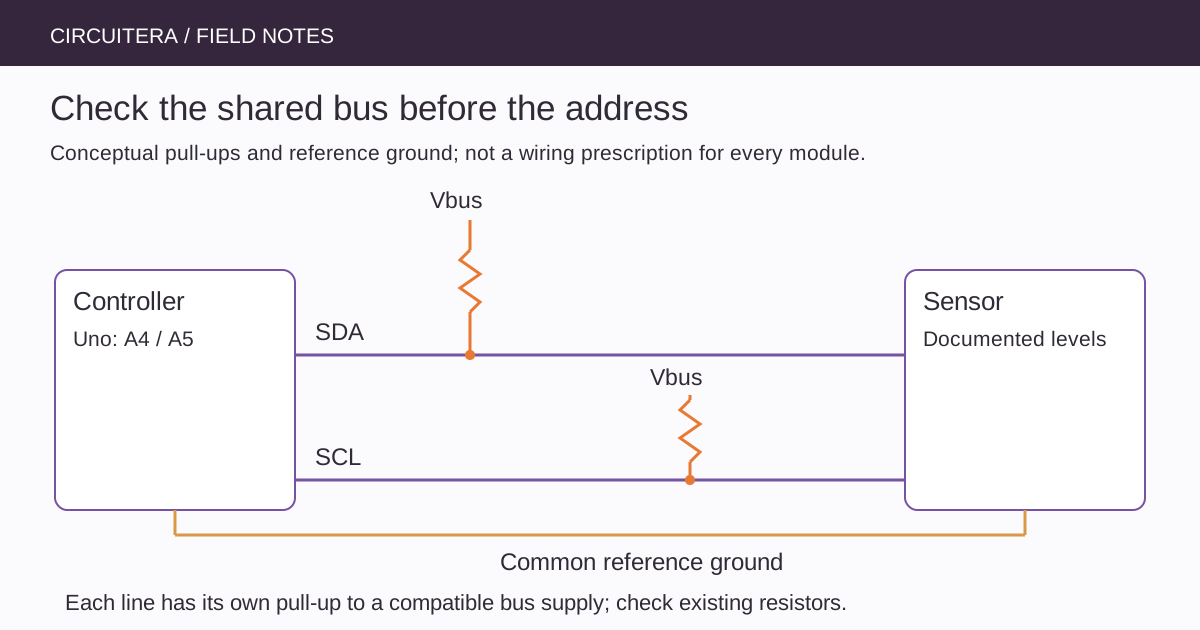
I²C uses SDA for data and SCL for clock. Devices release these open-drain-style bus lines to let pull-up resistors establish HIGH, and pull them LOW when required. A pull-up therefore has both a resistance and a voltage domain. Several breakout boards can place their pull-ups in parallel, changing the effective resistance.
Disconnect power and identify the sensor's supply, ground, SDA and SCL terminals. Determine whether the module includes a regulator, level conversion or pull-ups. Supplying a breakout from 5 V does not automatically prove that its signal pins accept 5 V, and an Uno pull-up arrangement should not be copied unchanged to an unspecified 3.3 V device.
Use the named board's actual bus pins
On the Uno R3, SDA corresponds to A4 and SCL to A5; the additional labeled SDA/SCL header provides access to the same bus signals. They are not a second independent bus. Other Arduino boards use different assignments, so choose the board reference before moving wires.
Use a common reference ground and short, understandable wiring for the first test. A long cable, several connectors or a large capacitive load can change signal rise times. Increasing the clock speed is not a remedy for an uncertain electrical connection.
Scan addresses once, with a bounded waiting policy
This sketch scans the normal non-reserved 7-bit address range at 100 kHz on the Uno R3. It uses the AVR Wire timeout API to avoid an indefinitely waiting transaction in the supported implementation. Run it only with hardware for which an address-only transaction is appropriate; a generic scanner is not guaranteed harmless on every unusual device.
#include <Wire.h>

void setup() {
  Serial.begin(9600);
  Wire.begin();
  Wire.setClock(100000UL);
  Wire.setWireTimeout(25000UL, true);
  for (byte address = 0x08; address <= 0x77; ++address) {
    Wire.clearWireTimeoutFlag();
    Wire.beginTransmission(address);
    const byte result = Wire.endTransmission();
    if (Wire.getWireTimeoutFlag()) {
      Serial.println(F("Bus timeout; inspect wiring and power."));
      break;
    }
    if (result == 0) {
      Serial.print(F("ACK at 0x"));
      if (address < 16) Serial.print('0');
      Serial.println(address, HEX);
    }
  }
  Serial.println(F("Scan finished. No sensor registers were interpreted."));
}

void loop() {
}
Open Serial Monitor at 9600 baud and reset the board if you need to repeat the one-time output. This is a diagnostic setup routine, not a background scanner to insert into a responsive control loop. The timeout limits the supported Wire operation; it does not repair a physically stuck line or promise the same API on another core.
Compare 7-bit and shifted address notation
Some device documents show a 7-bit address. Others print separate write and read address bytes that already include the low read/write bit. Passing that shifted byte directly to Wire can address the wrong device. Read the document's notation before editing the sketch.
Address-selection pins can also change a device's response. Check their required levels rather than assuming an unconnected selector has the desired state. If a board has two selectable addresses, try the documented configuration and read the scanner result as evidence, not as a replacement for understanding the pin.
An ACK is the beginning of the investigation
If the scanner finds the expected address, move to the device's documented identification or configuration sequence. Verify register addresses, byte order, operating mode and conversion-ready behavior. A library written for a similar-looking module may expect a different chip or a different register layout.
Two devices with the same address can both acknowledge, so a successful scan does not prove that they can coexist correctly. Change a supported address, use a suitable bus multiplexer or redesign the topology rather than treating one visible address as proof that only one device is present.
No responses do not identify one cause
Start with power and ground, then SDA/SCL assignment, pull-up voltage and the device's supported address. A device may require startup time or a specific enable state. An address-only scanner cannot prove whether its internal analog measurement path works.
If the timeout message appears, inspect whether SDA or SCL is held LOW and whether the connected devices are powered consistently. Avoid repeated software resets as a substitute for electrical investigation. Recovery procedures such as clocking a stuck bus should follow the devices' requirements and should not be improvised on a shared system containing important state.
Increase complexity in documented steps
Test one sensor first, then add the second device and compare results. Record each address, supply domain and pull-up arrangement. If adding a module makes both disappear, a shared-bus electrical or address conflict is a more useful hypothesis than assuming both libraries suddenly broke.
Use Circuitera to compile the Uno example and preserve its diagnostics. Its shipped Wire library must support the APIs used here; the compile check is separate from bus testing. No physical I²C scan or sensor calibration is claimed by this article. Once a known device reliably responds, return to the sensor diagnostic workflow to validate the meaning and quality of its measurements.
Sources and verification
Technical references were reviewed for this article. Board behavior is scoped to the named core and profile; follow a component’s actual datasheet when wiring hardware.