

Tested with Circuitera 1.0.0: the article’s complete C++ sketch compiled for Arduino Uno R3 using avr-gcc-wasm@0.2.0 on 2026-10-31 (UTC). No modeled execution is claimed for this article. No physical board was tested.
Serial Monitor can display a readable line even though the signal leaving the microcontroller is a timed sequence of HIGH and LOW levels. Understanding that sequence helps explain mismatched baud rates, crossed wires and apparently random characters. It also prevents a dangerous assumption: two connectors carrying serial data are not necessarily electrically compatible.
This is a wire-level UART explanation, using the classic Uno R3 as the named board. The existing Web Serial article covers browser permissions, USB transports and stream ownership. Those concerns remain important, but they begin at a different layer from the bit timing drawn here.
A UART agrees on timing without a shared clock wire
UART means universal asynchronous receiver/transmitter. In ordinary asynchronous use, sender and receiver agree on a baud rate and frame format. The receiver uses the start transition to establish when to sample the following bits. It does not receive a separate clock signal accompanying each bit.
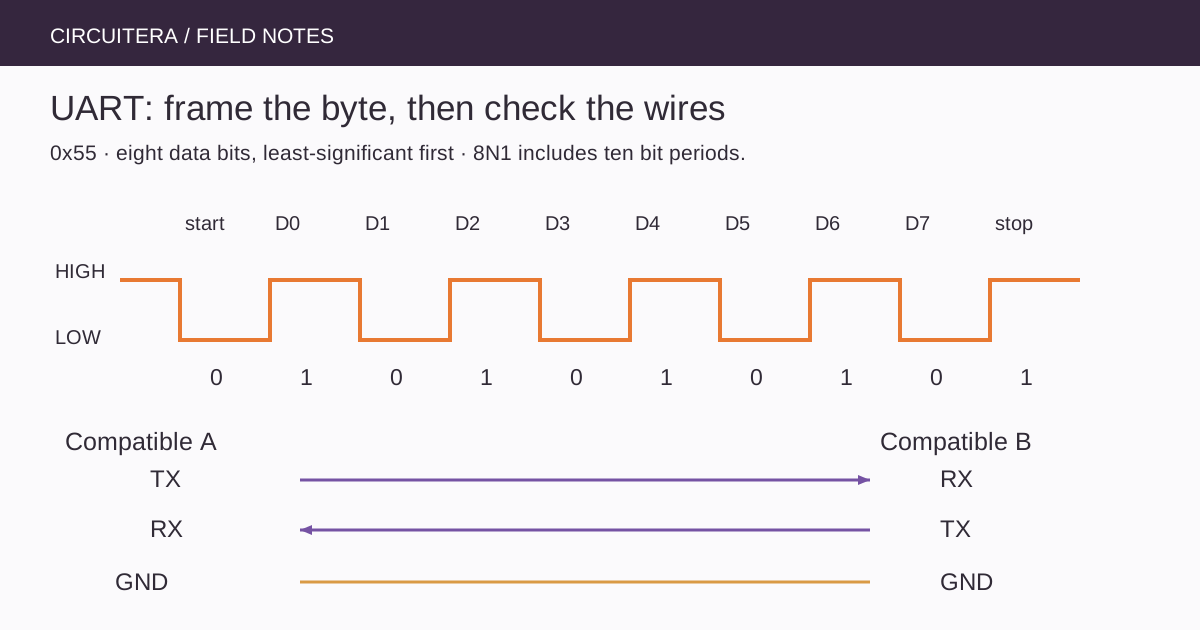
For a conventional non-inverted logic-level UART, the line idles HIGH and a start bit drives it LOW. Data bits follow, commonly least-significant bit first. Optional parity and one or more stop bits complete the frame. Both endpoints need compatible framing as well as compatible electrical levels.
Walk through one 8N1 byte
8N1 describes eight data bits, no parity and one stop bit. Including the start bit, that is ten transmitted bit periods for each data byte. At 9600 baud, one bit period is approximately 104 microseconds, so a continuously sent byte frame occupies about 1.04 milliseconds. These are ideal timing calculations, not captured measurements from this project.
The byte 0x55 has alternating data bits when sent least-significant bit first: 1, 0, 1, 0, 1, 0, 1, 0. The diagram separates the idle interval, start bit, eight data cells and stop bit. The alternation makes it a useful pattern to recognize with a properly connected logic analyzer, although a decoded trace still depends on the instrument's settings and electrical limits.
Start with a repeatable sender
This Uno R3 sketch sends the byte 0x55 periodically. Serial.write() sends the byte value itself; it does not send the two visible hexadecimal characters 5 and 5. In an ASCII text view, 0x55 appears as an uppercase U.
unsigned long sentAt = 0;

void setup() {
  Serial.begin(9600, SERIAL_8N1);
}

void loop() {
  const unsigned long now = millis();
  if (now - sentAt >= 500UL) {
    sentAt = now;
    Serial.write((byte)0x55);
  }
}
No additional wiring is needed to observe its text through the Uno's USB serial bridge after a normal upload. On the classic Uno, the MCU's hardware UART appears at D0/RX and D1/TX and is also connected to that bridge. Attaching another active transmitter to those lines can interfere with communication or create electrical contention.
Connect outputs to inputs, not outputs to outputs
For two suitably compatible logic-level UART devices, connect one device's TX output to the other's RX input. Connect a reference ground as required by the interface, and repeat the direction in reverse if both devices need to transmit. A TX label usually describes that device's output, but check the actual documentation rather than relying on an ambiguous adapter label.
Never join two push-pull TX outputs simply because both are serial signals. For an Uno-to-3.3 V device connection, inspect output voltage and input limits in each direction and use an appropriate level interface. A common ground does not make an overvoltage safe.
Logic UART is not an RS-232 connector
RS-232 uses a different electrical interface and normally needs an appropriate transceiver between it and a microcontroller's logic pins. A USB connector is another interface again; the presence of a USB cable does not mean its data wires can be connected to RX and TX.
Some development boards implement native USB, while the classic Uno R3 uses a separate USB-to-serial bridge. This article's D0/D1 discussion is scoped to that Uno arrangement. Board selection matters even when the Arduino API still uses the name Serial.
Estimate throughput before printing everything
At 9600 baud with 8N1, the ideal continuous payload rate is about 960 bytes per second before application-level framing and pauses. A long decimal number occupies several bytes, and Serial.println() adds line-ending bytes. Printing every value from a very fast sampling loop can fill the transmit buffer and cause code to wait for space.
That can make another task appear slow even though its own arithmetic is quick. Reduce the reporting rate, choose a compact message format or select a suitable baud rate supported by both ends. Do not assume a faster terminal setting changes the baud rate already configured in the firmware.
Diagnose characters and framing separately
Unreadable output first suggests checking baud, framing, voltage compatibility, common ground and pin assignment. Missing complete lines may instead involve line endings, startup timing or an application parser. A receiver gets bytes; the decision that a newline ends a message belongs to the application protocol.
If an instrument shows clean transitions but the decoder reports framing errors, inspect its baud and polarity configuration before changing the source. If the line never transitions, verify the running sketch and the selected physical pin. Keep measurements within the instrument's input ratings; a USB-connected analyzer's ground is not an arbitrary floating reference.
Keep the layers distinct
Compile the sender in Circuitera's IDE, then use Serial Tools with supported hardware when appropriate. Compilation establishes that the example builds; it does not certify a UART waveform or a two-board connection. A useful serial diagnosis names the layer at fault: electrical interface, bit framing, byte transport or message protocol. That vocabulary turns “serial is broken” into a testable next step.
Sources and verification
Technical references were reviewed for this article. Board behavior is scoped to the named core and profile; follow a component’s actual datasheet when wiring hardware.