

OLED Sensor Dashboard
Show a live potentiometer reading, estimated voltage, and proportional bar on an OLED.
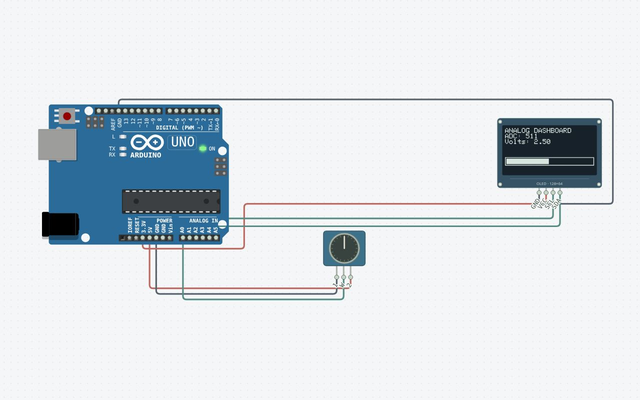
Wire it up
Disconnect power before changing connections. Follow terminal names rather than wire colors.
| From | To | Why it matters |
|---|---|---|
| Potentiometer (pot1) · VCC | Uno · 5V | Power connection |
| Potentiometer (pot1) · GND | Uno · GND.2 | Ground reference |
| Potentiometer (pot1) · SIG | Uno · A0 | Match this terminal to the sketch |
| SSD1306 OLED (oled1) · VCC | Uno · 3.3V | Power connection |
| SSD1306 OLED (oled1) · GND | Uno · GND.1 | Ground reference |
| SSD1306 OLED (oled1) · SDA | Uno · A4 | Match this terminal to the sketch |
| SSD1306 OLED (oled1) · SCL | Uno · A5 | Match this terminal to the sketch |
The complete sketch
#include <Wire.h>
#include <Adafruit_GFX.h>
#include <Adafruit_SSD1306.h>
Adafruit_SSD1306 display(128, 64, &Wire, -1);
void startDisplay() {
  if (!display.begin(SSD1306_SWITCHCAPVCC, 0x3C)) while (true) {}
  display.clearDisplay(); display.setTextSize(1); display.setTextColor(SSD1306_WHITE);
}
void setup() { startDisplay(); }
void loop() {
  int sample = analogRead(A0);
  display.clearDisplay(); display.setCursor(0, 0);
  display.println("ANALOG DASHBOARD");
  display.print("ADC: "); display.println(sample);
  display.print("Volts: "); display.println(sample * 5.0 / 1023.0, 2);
  display.drawRect(0, 42, 128, 12, SSD1306_WHITE);
  display.fillRect(2, 44, map(sample, 0, 1023, 0, 124), 8, SSD1306_WHITE);
  display.display(); delay(100);
}
The launch buttons use this same code and a matching saved circuit.
Build it step by step
Open a complete project
Launch in Simulator creates a separate Uno sketch and its matching wired circuit. Existing sketches are preserved. Press Run to compile and execute.
Explore the live circuit
Turn the knob while running. The number and bar should follow the same analog sample.
Try it on hardware
Disconnect power while wiring. Match terminal names in the table, select the exact board, Verify, then connect and upload. Check component ratings and power requirements first.
Understand the sketch
A small dashboard
Each frame clears the old value, samples A0, draws the new text and bar, then transfers one complete buffer. The voltage estimate assumes a 5 V reference.
If something is different
Display stays unchanged
Keep display.display inside loop and the potentiometer SIG wire on A0.
Expected output and tested scope
The OLED value/bar changes when the potentiometer input changes.
Version 1 · Last source- and build-matched test: 2026-10-25. Actual shipped AVR-GCC WASM compilation and Uno AVR engine execution; no physical hardware test.
Supported tutorial target: Arduino Uno R3 / ATmega328P. Compile: PASS · Modeled execution: PASS. Other boards require a separate review of pins, voltage, libraries and the exact build profile.