

DHT11 Temperature & Humidity
Read temperature and humidity using the DHT library and a powered sensor with a DATA pull-up.
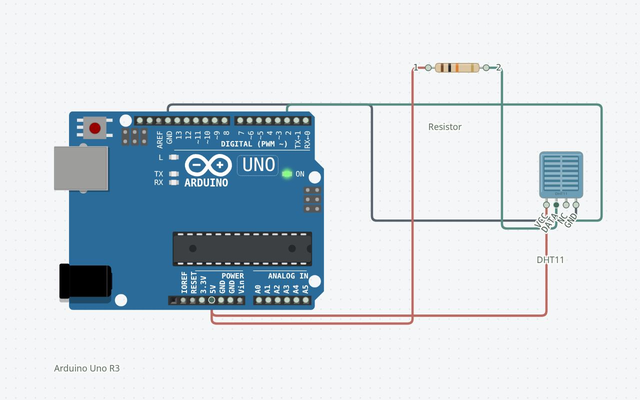
Wire it up
Disconnect power before changing connections. Follow terminal names rather than wire colors.
| From | To | Why it matters |
|---|---|---|
| DHT11 (sensor1) · VCC | Uno · 5V | Power connection |
| DHT11 (sensor1) · GND | Uno · GND.1 | Ground reference |
| DHT11 (sensor1) · DATA | Uno · 2 | Match this terminal to the sketch |
| Resistor (pullup) · 1 | Uno · 5V | Power connection |
| Resistor (pullup) · 2 | DHT11 (sensor1) · DATA | Match this terminal to the sketch |
The complete sketch
#include <DHT.h>
DHT sensor(2, DHT11);
void setup() { Serial.begin(9600); sensor.begin(); }
void loop() {
  float temperature = sensor.readTemperature();
  float humidity = sensor.readHumidity();
  if (isnan(temperature) || isnan(humidity)) {
    Serial.println("Read failed");
  } else {
    Serial.print("temperature:"); Serial.print(temperature);
    Serial.print(" humidity:"); Serial.println(humidity);
  }
  delay(2000);
}
The launch buttons use this same code and a matching saved circuit.
Build it step by step
Open a complete project
Launch in Simulator creates a separate Uno sketch and its matching wired circuit. Existing sketches are preserved. Press Run to compile and execute.
Explore the live circuit
Run for at least two seconds, open simulated serial output, and change the sensor temperature or humidity.
Try it on hardware
Disconnect power while wiring. Match terminal names in the table, select the exact board, Verify, then connect and upload. Check component ratings and power requirements first.
Understand the sketch
A timed digital protocol
The DHT library decodes timed data pulses. The simulator supplies ideal DHT11 frames from its temperature and humidity properties; it does not model sensor accuracy or environmental lag.
If something is different
Read failed
Use DHT11 in the constructor and a 10 kΩ DATA-to-5 V pull-up. NC remains unconnected. Wait between readings.
Expected output and tested scope
Serial output contains temperature and humidity readings; the default modeled sensor state is approximately 25 °C and 50% relative humidity.
Version 1 · Last source- and build-matched test: 2026-10-25. Actual shipped AVR-GCC WASM compilation and Uno AVR engine execution; no physical hardware test.
Supported tutorial target: Arduino Uno R3 / ATmega328P. Compile: PASS · Modeled execution: PASS. Other boards require a separate review of pins, voltage, libraries and the exact build profile.