
Momentary tactile pushbutton
Identify paired tactile-switch legs and wire a momentary button to an Arduino using its internal pull-up and active-low logic.
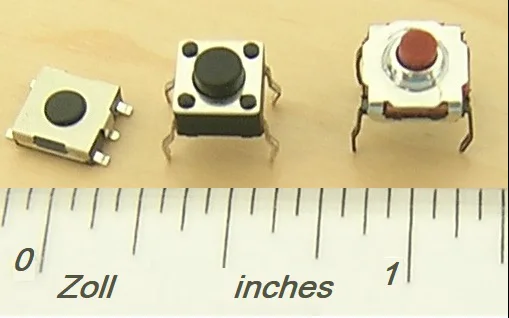

Overview
A common tactile switch closes two contacts while pressed and opens them after release. A button read as a digital input needs a defined idle level.
Breadboard wiring
Enable INPUT_PULLUP on the input and connect the switch between the input and ground. A pressed switch reads low. Four-pin button packages often have two internally joined leads on each side; identify the pairs using a continuity meter before wiring.
Interpreting button events
Mechanical contacts may bounce as they close. If the sketch should count one event per press, wait for a stable state before accepting the edge. Avoid placing the switch directly across the supply.
Specifications
| Parameter | Value or condition | Source |
|---|---|---|
| Arduino input mode | INPUT_PULLUP supplies the idle high level | Arduino |
| Pressed state in the example | LOW with the switch wired between the input and ground | Arduino |
Compatibility and practice
Arduino INPUT_PULLUP allows a switch to ground with no external pull-up in simple circuits.
Related components
Sources and datasheets
- InputPullupSerial wiring example · Arduino